Rapid Invisible Frequency Tagging (RIFT) using the PROPixx 1440 Hz mode
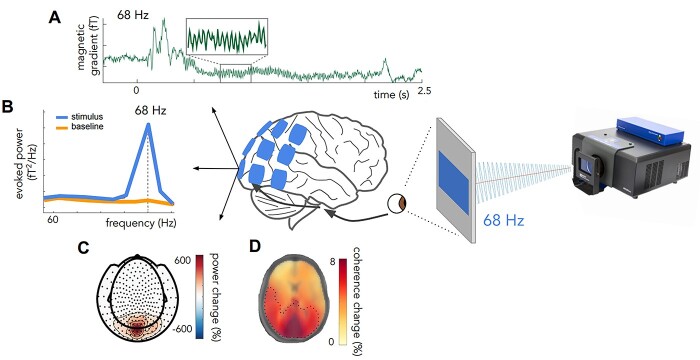
Frequency tagging uses flickering stimuli to evoke signals at the same frequencies in the brain. These signals, called steady state visually evoked potentials (SSVEPs) in EEG and steady state visually evoked fields (SSVEFs) in MEG/OPM, can shed light on visual and cognitive processes. For instance, the relative amplitude of SSVEPS can reflect processes like attention, and the progression of the signal across brain regions demonstrates the pathway of visual information processing.
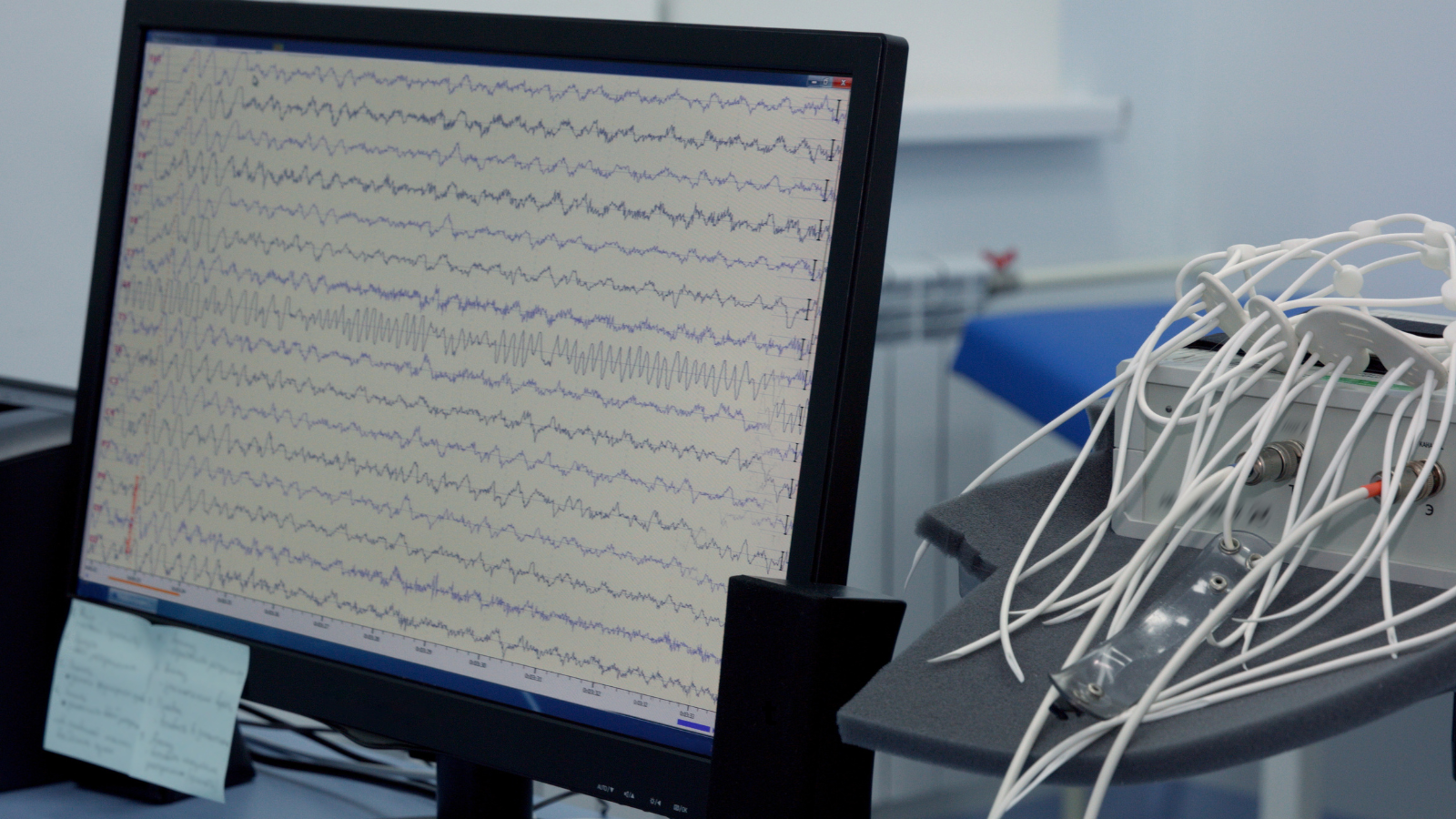
EEG traces can be analyzed to reveal frequencies evoked by the stimulus display
Traditional frequency tagging paradigms use visibly flickering stimuli (e.g., < 50 Hz). Low-frequency tagging has some disadvantages:
they can irritate and make participants uncomfortable
they can obscure other low-frequency signals of interest
they can make it difficult to measure specific kinds of cognitive and perceptual processes (e.g., covert attention)
Researchers at the University of Birmingham have demonstrated that a smoothly modulated or sinusoidal flicker >50 Hz can reliably evoke SSVEFs while remaining invisible to the participant. This method, called Rapid Invisible Frequency Tagging (RIFT), opens up many new avenues for research; since its inception, it has been used to study brain-computer interfaces, language perception, attention and more.
A key advantage of RIFT is that experimental paradigms can be ‘hidden’ in naturalistic tasks without alerting the participant. This makes them ideal for more extended studies or testing special populations like children.
For an excellent review of RIFT from a research perspective, we recommend this article:
Seijdel N, Marshall TR, Drijvers L.
Cereb Cortex. 2023 Feb 20;33(5):1626-1629.
doi: 10.1093/cercor/bhac160
Methodologically, RIFT can only be achieved using a high-speed display. The display must update fast enough to generate a smoothly modulated flicker that maintains a target frequency > 60 Hz.
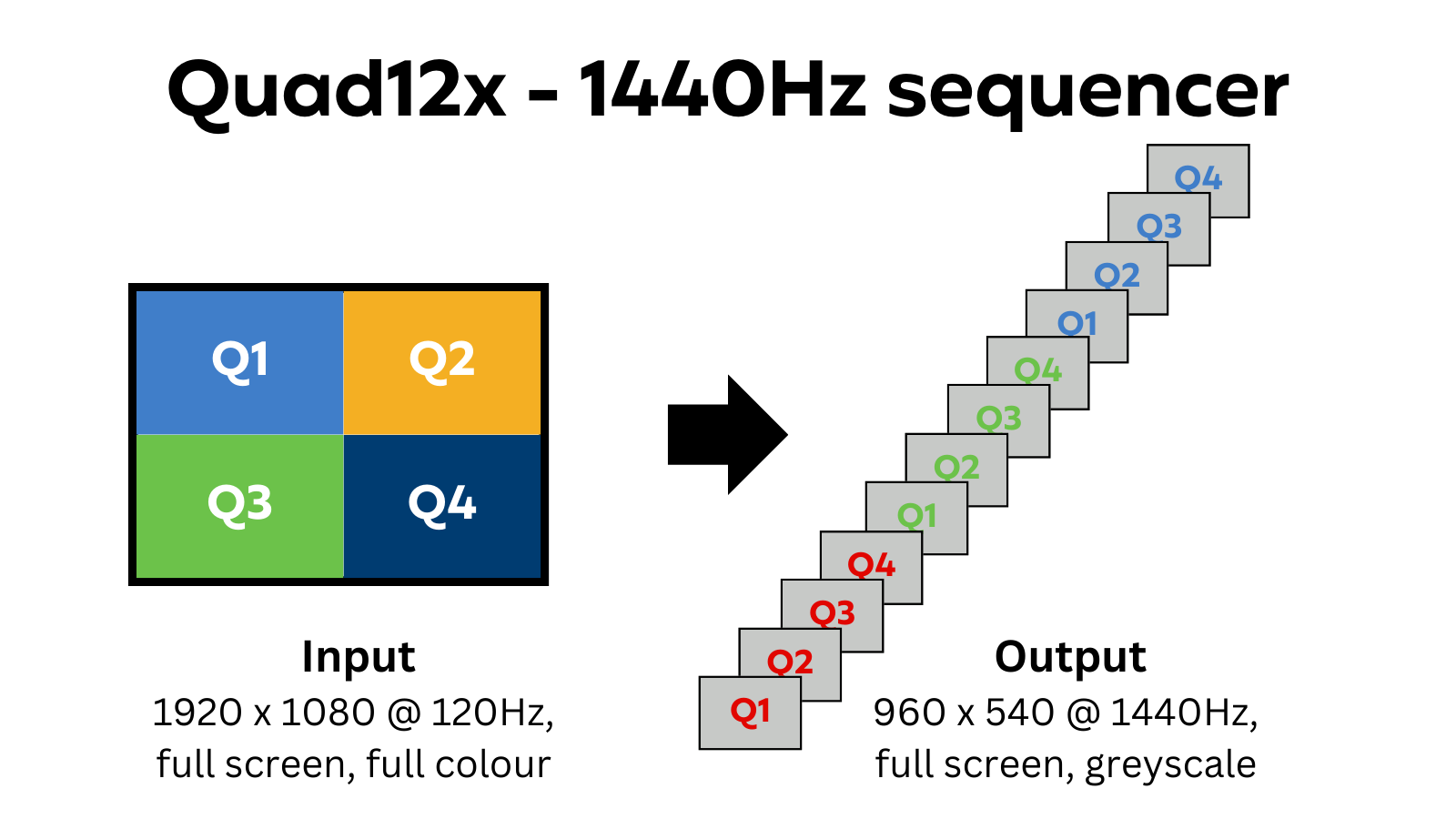
This is where the PROPixx comes in. The QUAD12X mode on the projector operates at 1440 frames per second in greyscale (960 x 540 resolution), allowing for high-speed frame transitions with the temporal resolution required to support RIFT applications.
The rest of this guide reviews QUAD12X mode and uses it to present a high-speed modulating stimulus with a custom frequency set by the user. Code examples are given and appropriate image rendering strategies are discussed.
In QUAD12X mode, the PROPixx receives full HD resolution video (1920 x 1080) at 120 Hz from your PC. It then ‘breaks down’ each frame of this video into 12 distinct subframes. It shows each subframe in a sequence; each subframe is shown full screen, greyscale. This produces a final display refresh rate of 1440 Hz (120 x 12).
The order in which a composite 120 Hz image is broken down is as follows:
The image is subdivided into four ‘quadrants’
Each quadrant is further divided into red, green and blue colour channels, and interpreted as 8 bit greyscale
The subframes are shown in the following order: Q1R, Q2R, Q3R, Q4R, Q1G …. Q4B
Following the example in Seijdel et al. (2023), we will present a static image in the center of the display, with a 68 Hz sinusoidal mask applied overtop, for 20 seconds. The code can easily be modified for different target frequencies.
Tiling the stimulus into quadrants
First, we must configure our ‘composite’ 120 Hz stimulus to format the 1440 Hz output correctly. We will use this as our stimulus:
As a first step, we must tile this stimulus to appear in the center of all four quadrants in our composite image. This will ensure it appears in the center of the 1440 Hz display on each subframe. Remember, the images in each quadrant will be shown full-screen, twice as large, in the final output.
A simple helper function loads and tiles the 960 x 540 image and background. Click on the tab below to expand the section and view the code.
createTiledTexture
MATLAB
function tiledTexture = createTiledTexture(imagePath)
    % CREATE TILED TEXTURE
    % This function loads a 960x540 PNG image and tiles it 2x2
    % to generate a 1920x1080 image texture.
    %
    % INPUT:
    %   imagePath - Path to the 960x540 PNG image file.
    %
    % OUTPUT:
    %   tiledTexture - 1920x1080 texture formed by tiling the image.

    % Load the PNG image
    img = imread(imagePath);

    % Check if the image is 960x540, if not, show an error
    [height, width, ~] = size(img);
    if (height ~= 540 || width ~= 960)
        error('Input image must be 960x540 in size.');
    end

    % Tile the image 2x2
    tiledTexture = repmat(img, 2, 2);
end
Because our stimulus is already in greyscale and static, this is all we need to do to format it. If this were a dynamic or colour image, we would need to generate a more complex image that ‘zeros’ the colour channels not associated with the target subframes. For instance, an image shown exclusively on the first four subframes (red colour channel) should not have any blue or green colour data. Composite images with data in more than one colour channel will be split into the relevant subframes:
Red channel only
Blue and red channels
Generating the mask transparencies for sinusoidal output
Now, let’s consider our mask. We need to identify each subframe's transparency level to generate a smooth oscillation between transparent and opaque. This is a slowed-down version of what we want the result to look like:
Mask with oscillating transparency from fully transparent → opaque
Rather than building a list of transparency values in advance, we compute each subframe's transparency from the system clock at the moment that subframe will be displayed: sin(2*pi*f*(t + s/1440)) for subframe s of the frame drawn at time t. Click on the expand tab to view the helper function.
transparencyAt
MATLAB
function transparency = transparencyAt(t, stimFreq, depth)
% TRANSPARENCY AT TIME t
% Sine-wave transparency (0-255) at time t seconds after onset.
%
% Evaluated from clock time rather than a stepped array index, so a
% dropped frame cannot accumulate a phase error: the phase is always
% sin(2*pi*f*t) at the subframe's scheduled display time, and the
% analysis reference can be regenerated from the same formula.
% Rounded to 8 bits.
%
% INPUTS:
%   t         - Time in seconds since mask onset
%   stimFreq  - Sinusoidal frequency in Hz (e.g., 68)
%   depth     - Fraction of the full 0-255 swing (e.g., 0.25)
%
% OUTPUT:
%   transparency - Transparency value (0-255)

phase = sin(2 * pi * stimFreq * t);
transparency = round(127.5 + 127.5 * depth * phase);
end
Why compute from the clock? If the computer misses a frame, a pre-computed list keeps stepping forward as if the frame had been shown. Every later subframe is then out of phase for the rest of the run: one dropped frame at 68 Hz shifts the tag by roughly 200 degrees, enough to decorrelate it from your analysis reference. Computing from the clock turns a dropped frame into a brief stutter; the next frame lands back on the correct phase.
The depth argument sets how much of the full 0 - 255 range the mask uses. At full depth (1.0) a faint 68 Hz shimmer can be visible up close on the PROPixx. The demos use 0.25, which is invisible.
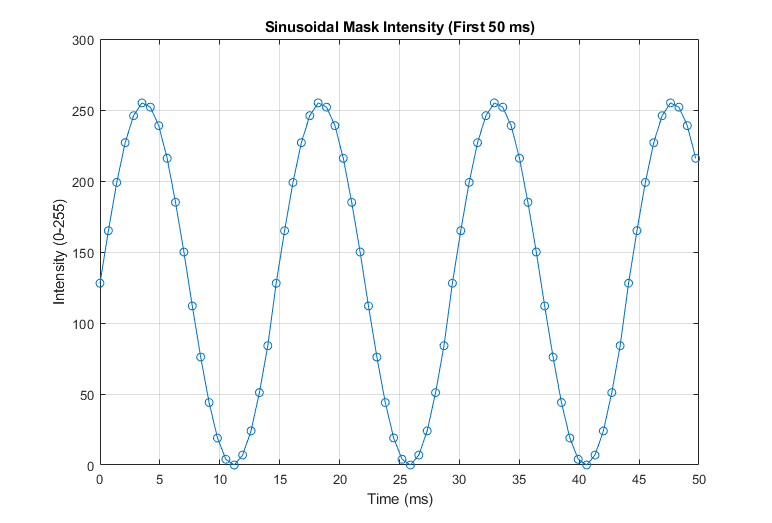
Here’s what the first 50 ms of transparency samples look like at full depth, plotted:
Intensities for a 68 Hz signal divided into 1440 frames/second
Formatting mask to ensure correct subframe assignment
The mask is a circle that covers the image and oscillates its transparency 0-255. We know the transparency value on each subframe, the final desired position of the mask (center of the frame) and the size (diameter = width of the stimulus image). To build our composite 120 Hz image we need to draw 12 of these masks in a single framebuffer, along with our tiled background, then pass everything to the display.
When drawing each of our 12 masks, we need to ensure:
The colour channel corresponds to the correct target subframe
The blend mode is set correctly (see the section below)
The position of the mask is offset to reflect its quadrant
The helper function drawCircularMask does all of these steps for us automatically. We need to pass it the mask properties and subframe number, and it will do the rest.
Pass the centre of the 1920 x 1080 composite image, (960, 540), as the base position x, y. Psychtoolbox rects use a top-left origin, and the quadrant offsets are measured from the centre; with (0, 0), three of the four quadrant masks are drawn off-screen and the tag is lost.
drawCircularMask
MATLAB
function drawCircularMask(windowPtr, transparency, subframe, x, y, diameter)
    % DRAW CIRCULAR MASK WITH COLOR AND TRANSPARENCY
    % This function draws a circular mask at a specified position,
    % with color and transparency based on the subframe index.
    %
    % INPUTS:
    %   windowPtr    - Pointer to the Psychtoolbox window
    %   transparency - Alpha transparency value (0 = fully transparent, 255 = fully opaque)
    %   subframe     - Determines position offset and color (1-12)
    %   x, y         - Base position of the circle (center coordinates)
    %   diameter     - Diameter of the circle in pixels
    %
    % OUTPUT:
    %   A colored circle with the specified transparency drawn in the window

    % Determine color and blend function based on subframe using mod
    colorIndex = mod(subframe - 1, 12); % Normalize subframe to range [0, 11]

    if colorIndex < 4
        color = [255, 0, 0, transparency];  % Red component
        blendColor = [1, 0, 0, 0];
    elseif colorIndex < 8
        color = [0, 255, 0, transparency];  % Green component
        blendColor = [0, 1, 0, 0];
    else
        color = [0, 0, 255, transparency];  % Blue component
        blendColor = [0, 0, 1, 0];
    end

    % Apply blend function
    Screen('BlendFunction', windowPtr, GL_SRC_ALPHA, GL_ONE_MINUS_SRC_ALPHA, blendColor);

    % Compute the radius from the given diameter
    radius = (diameter / 2);

    % Determine position offset based on subframe index
    switch mod(subframe - 1, 4) + 1
        case 1
            offset = [-960/2, -540/2];  % Top-left quadrant
        case 2
            offset = [960/2, -540/2];   % Top-right quadrant
        case 3
            offset = [-960/2, 540/2];   % Bottom-left quadrant
        case 4
            offset = [960/2, 540/2];    % Bottom-right quadrant
    end

    % Apply offset to the base position
    position = [x, y] + offset;

    % Define the bounding box for the circular mask
    rect = [position(1) - radius, position(2) - radius, ...
            position(1) + radius, position(2) + radius];

    % Draw the circular mask with the computed color and transparency
    Screen('FillOval', windowPtr, color, rect);

    % Reset blend function to default after drawing
    Screen('BlendFunction', windowPtr, GL_SRC_ALPHA, GL_ONE_MINUS_SRC_ALPHA, [1, 1, 1, 1]);
end
On blending functions and overlapping stimuli
In many cases, when building the composite image for our display, layers in the image will overlap one another. In this case, the software has to decide how to combine the layers; this process is called blending. Most software will, by default, treat opaque layers as obscuring the layers beneath them. If a layer is semi-transparent, the software typically computes a weighted average of this layer and the one below it (alpha blending). An alternative is additive blending, where colour channel data is independent and sums in the final display.
Types of blending
In QUAD12X mode, we need to perform alpha blending within a colour channel and additive blending across channels to preserve all of the grayscale data in different subframes of the final 1440 Hz display.
Fortunately, this can easily be done in MATLAB with the Screen('BlendFunction') command from Psychtoolbox:
MATLAB
% Alpha blend red channel, do not alter other channel data
Screen('BlendFunction', windowPtr, GL_SRC_ALPHA, GL_ONE_MINUS_SRC_ALPHA, [1 0 0 0]);
This results in alpha blending the specified colour channel in the list [r, g, b, alpha] while leaving other channels (set to 0) unaffected.
PsychoPy has no per-channel blend option, but it doesn't need one. OpenGL's glColorMask restricts which colour channels a draw call can write to, independently of the blend function. Locking the channel before each mask draw gives the same result as the MATLAB blend function above:
Python
def draw_circular_mask(mask, transparency, subframe):
    """Draw one circular mask with channel-locked alpha blending.

    `mask` is one of 12 visual.Circle objects created once at setup, each
    already carrying its subframe's fixed fillColor and quadrant pos: only
    opacity changes per call. Setting fillColor/pos on a PsychoPy stimulus
    triggers a colour-space/geometry recompute, which is too slow to do 12x
    per 8.3 ms frame.

    mask         - the pre-created visual.Circle for this subframe
    transparency - 0-255 (0 = fully transparent, 255 = fully opaque)
    subframe     - 0-11; selects the colour channel (subframe // 4) to lock
    """
    channel = (subframe % 12) // 4                # 0=R, 1=G, 2=B
    mask.opacity = transparency / 255.0

    # Lock framebuffer writes to this subframe's channel; the alpha
    # blend then cannot overwrite the other subframes sharing this
    # quadrant. Alpha writes stay off (blending uses source alpha only).
    glColorMask(GL_TRUE if channel == 0 else GL_FALSE,
                GL_TRUE if channel == 1 else GL_FALSE,
                GL_TRUE if channel == 2 else GL_FALSE,
                GL_FALSE)
    mask.draw()
    # Reset to writing all channels.
    glColorMask(GL_TRUE, GL_TRUE, GL_TRUE, GL_TRUE)
Putting it all together
So far we have identified several discrete steps for generating a composite image in our RIFT display. They are:
Tile our static, greyscale 960 x 540 image into four quadrants
Compute each subframe's mask transparency from the clock at its display time
Generate 12 masks for our composite image using our transparency list and our helper function
As a reminder, we want our final display to look like this (but much faster):
Final display, slowed down
Below is the entire MATLAB and Python code to achieve this output. You can download the stimulus image here: [download]. Make sure it is in the same folder as your test script.
RIFT Demo - MATLAB
MATLAB
%% RIFT Demo - MATLAB (Psychtoolbox)
%
% Presents a static image in the center of the display with a 68 Hz
% sinusoidal mask applied overtop, using the PROPixx QUAD12X mode
% (1440 Hz greyscale, 960 x 540).
%
% The flicker phase comes from the system clock, not from stepping through
% a precomputed transparency array. Each subframe's transparency is
% evaluated at its scheduled display time, sin(2*pi*f*(t + s/1440)). With
% an array index, one dropped frame would shift every later subframe's
% phase for the rest of the run (a single 120 Hz drop at 68 Hz is roughly
% 200 degrees). With clock time, a drop is a brief stutter; the next
% rendered frame lands back on the correct phase.
%
% Place logo_960x540.png (download link on the VOCAL page) in the same
% folder as this script.
%
% Is it working?! The whole point of RIFT is that the oscillation is
% invisible. If you see a static grey logo, the code is working. Try
% stimFreq = 5 to see the oscillation.

%%%%MAIN SCRIPT
KbName('UnifyKeyNames');   % consistent key names for the ESCAPE check below
%Set some important variables
imagePath = 'logo_960x540.png';
tiledTexture = createTiledTexture(imagePath);
stimFreq = 68;          % Hz (try 5 to make the oscillation visible)
modDepth = 0.25;        % fraction of the full 0-255 alpha swing. At full depth
                        % (1.0) a 68 Hz shimmer can be visible; 0.25 is
                        % invisible and still gives a strong tag
duration = 20;          % seconds
maskDiameter = 600;     % covers the whole logo
frameRate = 1440;       % QUAD12X subframe rate
subframeDt = 1 / frameRate;

% Initialize VPixx Hardware
isConnected = Datapixx('isReady');
if ~isConnected
    Datapixx('Open');
end
Datapixx('SetPropixxDlpSequenceProgram', 5);        %Set Propixx to 1440Hz refresh (also known as Quad12x)
Datapixx('RegWrRd');

% Initialize Psychtoolbox
% The PROPixx is assumed to be the highest screen index; change if needed.
screens = Screen('screens');
screenID = max(screens);
windowPtr = Screen('OpenWindow', screenID, [255,255,255]); % Open fullscreen window with white background
Screen('BlendFunction', windowPtr, GL_SRC_ALPHA, GL_ONE_MINUS_SRC_ALPHA);  % Set blend mode
stimulus = Screen('MakeTexture', windowPtr, tiledTexture);  % Create texture from image

% The flicker runs on the system clock: each subframe's transparency is
% evaluated at its scheduled display time, so a dropped frame is a brief
% stutter rather than a lasting phase slip. GetSecs is used rather than
% Datapixx('GetTime') so the loop carries no per-flip USB register read.
escapeKey = KbName('ESCAPE');     % looked up once, outside the loop
t0 = GetSecs;                      % zeroed here, at mask onset

while (GetSecs - t0) < duration
    % Display the tiled image (all channels, so all 12 subframes)
    Screen('DrawTexture', windowPtr, stimulus);

    % Loop through 12 iterations of masks. Subframe s of this cable
    % frame is displayed s * subframeDt after the frame onset.
    frameTime = GetSecs - t0;   % not `now`: that shadows MATLAB's built-in
    for subframe = 1:12
        subT = frameTime + (subframe - 1) * subframeDt;
        % Base position is the screen centre (960, 540): Psychtoolbox rects
        % use a top-left origin, and the quadrant offsets are relative to it.
        transparency = transparencyAt(subT, stimFreq, modDepth);
        drawCircularMask(windowPtr, transparency, subframe, 960, 540, maskDiameter);
    end

    Screen('Flip', windowPtr);

    [keyIsDown, ~, keyCode] = KbCheck;
    if keyIsDown && keyCode(escapeKey)
        break
    end
end

% Close down after the loop
Screen('CloseAll');
Datapixx('SetPropixxDlpSequenceProgram', 0);
Datapixx('RegWrRd');
Datapixx('Close');

%% HELPER FUNCTIONS

function tiledTexture = createTiledTexture(imagePath)
% CREATE TILED TEXTURE
% This function loads a 960x540 PNG image and tiles it 2x2
% to generate a 1920x1080 image texture.
%
% INPUT:
%   imagePath - Path to the 960x540 PNG image file.
%
% OUTPUT:
%   tiledTexture - 1920x1080 texture formed by tiling the image.

% Load the PNG image
img = imread(imagePath);

% Check if the image is 960x540, if not, show an error
[height, width, ~] = size(img);
if (height ~= 540 || width ~= 960)
    error('Input image must be 960x540 in size.');
end

% Tile the image 2x2
tiledTexture = repmat(img, 2, 2);
end

function transparency = transparencyAt(t, stimFreq, depth)
% TRANSPARENCY AT TIME t
% Sine-wave transparency (0-255) at time t seconds after onset.
%
% Evaluated from clock time rather than a stepped array index, so a
% dropped frame cannot accumulate a phase error: the phase is always
% sin(2*pi*f*t) at the subframe's scheduled display time, and the
% analysis reference can be regenerated from the same formula.
% Rounded to 8 bits.
%
% INPUTS:
%   t         - Time in seconds since mask onset
%   stimFreq  - Sinusoidal frequency in Hz (e.g., 68)
%   depth     - Fraction of the full 0-255 swing (e.g., 0.25)
%
% OUTPUT:
%   transparency - Transparency value (0-255)

phase = sin(2 * pi * stimFreq * t);
transparency = round(127.5 + 127.5 * depth * phase);
end

function drawCircularMask(windowPtr, transparency, subframe, x, y, diameter)
% DRAW CIRCULAR MASK WITH COLOR AND TRANSPARENCY
% This function draws a circular mask at a specified position,
% with color and transparency based on the subframe index.
%
% INPUTS:
%   windowPtr    - Pointer to the Psychtoolbox window
%   transparency - Alpha transparency value (0 = fully transparent, 255 = fully opaque)
%   subframe     - Determines position offset and color (1-12)
%   x, y         - Base position of the circle (center coordinates)
%   diameter     - Diameter of the circle in pixels
%
% OUTPUT:
%   A colored circle with the specified transparency drawn in the window

% Determine color and blend function based on subframe using mod
colorIndex = mod(subframe - 1, 12); % Normalize subframe to range [0, 11]
if colorIndex < 4
    color = [255, 0, 0, transparency];  % Red component
    blendColor = [1, 0, 0, 0];
elseif colorIndex < 8
    color = [0, 255, 0, transparency];  % Green component
    blendColor = [0, 1, 0, 0];
else
    color = [0, 0, 255, transparency];  % Blue component
    blendColor = [0, 0, 1, 0];
end

% Apply blend function
Screen('BlendFunction', windowPtr, GL_SRC_ALPHA, GL_ONE_MINUS_SRC_ALPHA, blendColor);

% Compute the radius from the given diameter
radius = (diameter / 2);

% Determine position offset based on subframe index
switch mod(subframe - 1, 4) + 1
    case 1
        offset = [-960/2, -540/2];  % Top-left quadrant
    case 2
        offset = [960/2, -540/2];   % Top-right quadrant
    case 3
        offset = [-960/2, 540/2];   % Bottom-left quadrant
    case 4
        offset = [960/2, 540/2];    % Bottom-right quadrant
end

% Apply offset to the base position
position = [x, y] + offset;

% Define the bounding box for the circular mask
rect = [position(1) - radius, position(2) - radius, ...
        position(1) + radius, position(2) + radius];

% Draw the circular mask with the computed color and transparency
Screen('FillOval', windowPtr, color, rect);

% Reset blend function to default after drawing
Screen('BlendFunction', windowPtr, GL_SRC_ALPHA, GL_ONE_MINUS_SRC_ALPHA, [1, 1, 1, 1]);
end
RIFT Demo - Python
Python
"""RIFT Demo - Python (PsychoPy)

Presents a static image in the center of the display with a 68 Hz
sinusoidal mask applied overtop, using the PROPixx QUAD12X mode
(1440 Hz greyscale, 960 x 540). This is the Python counterpart of
the MATLAB/Psychtoolbox RIFT demo; the stimulus is identical.

Channel locking. Psychtoolbox restricts alpha blending to
one colour channel via the 4th argument of Screen('BlendFunction'),
e.g. [1 0 0 0] for red only. PsychoPy has no per-channel blend API, but
it does not need one: OpenGL's glColorMask is independent of the blend
function and persists across stim draws, so we wrap each draw call:

    glColorMask(R?, G?, B?, GL_FALSE)   # lock writes to one channel
    mask.draw()                         # alpha blend within that channel
    glColorMask(GL_TRUE, GL_TRUE, GL_TRUE, GL_TRUE)

The mask alpha-blends into its target subframe's channel and cannot
overwrite the data the other subframes carry in the same quadrant.

Clock-driven phase: the flicker phase comes from the system clock, not from
stepping through a precomputed transparency array. Each subframe's
transparency is evaluated at its scheduled display time,
sin(2*pi*f*(t_flip + s/1440)). The reason is frame drops: with an array
index, one dropped frame shifts every later subframe's phase for the
rest of the run (a single 120 Hz drop at 68 Hz is roughly 200 degrees,
enough to decorrelate the tag from the analysis reference). With clock
time, a drop is a transient; the next rendered frame lands back on the
correct phase.

Requires: psychopy, pypixxlib, numpy, PIL. Place logo_960x540.png
(download link on the VOCAL page) in the same folder as this script.

Is it working?! The whole point of RIFT is that the oscillation is
invisible. If you see a static grey logo, the code is working. Try
STIM_FREQ = 5 to see the oscillation.
"""

import math

import numpy as np
from PIL import Image
from psychopy import core, event, visual
from pyglet.gl import GL_FALSE, GL_TRUE, glColorMask
from pypixxlib import _libdpx as dp

# ---------------------------------------------------------------------------
# Settings
# ---------------------------------------------------------------------------
IMAGE_PATH    = 'logo_960x540.png'
STIM_FREQ     = 68        # Hz (try 5 to make the oscillation visible)
MOD_DEPTH     = 0.25      # fraction of the full 0-255 alpha swing. At full
                          # depth (1.0) a 68 Hz shimmer can be visible; 0.25 is
                          # invisible and still gives a strong tag
DURATION      = 20        # seconds
MASK_DIAMETER = 600       # px, covers the whole logo
FRAME_RATE    = 1440      # QUAD12X subframe rate
SUBFRAME_DT   = 1.0 / FRAME_RATE
SCREEN_SIZE   = (1920, 1080)   # PROPixx cable-frame resolution
PREFERRED_SCREEN = 1      # a hint; pick_propixx_screen overrides it if invalid

# Quadrant centre offsets in pixels, indexed by subframe % 4. The
# subframe order is Q1R Q2R Q3R Q4R, Q1G ... Q4B, with Q1 at top-left.
# These are the MATLAB offsets with the y sign flipped: PsychoPy's y
# axis points up, so 'top' is +y.
QUADRANT_OFFSETS = [(-960 / 2,  540 / 2),    # Q1 top-left
                    ( 960 / 2,  540 / 2),    # Q2 top-right
                    (-960 / 2, -540 / 2),    # Q3 bottom-left
                    ( 960 / 2, -540 / 2)]    # Q4 bottom-right

# Full-intensity mask colour for each channel block (R, G, B), kept for
# parity with the MATLAB. With glColorMask locked the off channels are
# never written, so the colour is redundant; it costs nothing.
CHANNEL_COLORS = [(1, -1, -1), (-1, 1, -1), (-1, -1, 1)]


# ---------------------------------------------------------------------------
# Helper functions
# ---------------------------------------------------------------------------

def pick_propixx_screen(preferred=PREFERRED_SCREEN):
    """Return the PsychoPy screen index of the PROPixx (1920x1080).

    `preferred` is the screen you would normally name by hand. We only
    override it if it is clearly invalid for the current display layout:

      * If `preferred` is a valid index AND that screen is 1920x1080,
        use it as-is (the two-monitor rig, where you know which is which).
      * Otherwise pick the first 1920x1080 screen.
      * Otherwise fall back to screen 0.

    This covers the laptop-monitor-off case: with only the PROPixx
    connected, pyglet sees one screen (index 0) and a hardcoded
    screen=1 is invalid, so PsychoPy would crash.
    """
    try:
        import pyglet
        display = pyglet.canvas.get_display()
        screens = display.get_screens()
    except Exception as e:
        print(f"[rift] could not enumerate screens via pyglet ({e}); "
              f"using screen {preferred} as-is")
        return preferred

    sizes = [(s.width, s.height) for s in screens]
    labels = [f"#{i} {w}x{h}" for i, (w, h) in enumerate(sizes)]
    listing = ", ".join(labels)
    n_screens = len(screens)
    print(f"[rift] {n_screens} screen(s) detected: {listing}")

    if 0 <= preferred < n_screens and sizes[preferred] == SCREEN_SIZE:
        return preferred
    for i, sz in enumerate(sizes):
        if sz == SCREEN_SIZE:
            print(f"[rift] screen {preferred} is not the PROPixx; "
                  f"auto-routing to screen {i} ({sz[0]}x{sz[1]})")
            return i
    print("[rift] no 1920x1080 screen found; falling back to screen 0")
    return 0


def create_tiled_texture(image_path):
    """Load a 960x540 image and tile it 2x2 into a 1920x1080 texture.

    Each quadrant is shown full-screen, twice as large, in the final
    1440 Hz output; tiling puts the logo at the centre of every
    subframe. Returns a float array in PsychoPy's [-1, 1] range,
    flipped so it displays upright.
    """
    img_file = Image.open(image_path)
    img = img_file.convert('L')
    if img.size != (960, 540):
        raise ValueError('Input image must be 960x540 in size.')
    arr = np.asarray(img, dtype=np.float32) / 255.0
    tiled = np.tile(arr, (2, 2))                  # 1080 x 1920
    return np.flipud(tiled * 2.0 - 1.0)


def transparency_at(t, stim_freq, depth=MOD_DEPTH):
    """Sine-wave transparency (0-255) at time `t` seconds after onset.

    Evaluated from clock time rather than a stepped array index, so a
    dropped frame cannot accumulate a phase error: the phase is always
    sin(2*pi*f*t) at the subframe's scheduled display time, and the
    analysis reference can be regenerated from the same formula.
    Rounded to 8 bits.

    Uses math.sin rather than np.sin: this is called 12x per 8.3 ms
    composite frame for a single scalar, where numpy's per-call overhead
    is enough to cause occasional dropped frames.
    """
    phase = math.sin(2 * math.pi * stim_freq * t)
    return round(127.5 + 127.5 * depth * phase)


def draw_circular_mask(mask, transparency, subframe):
    """Draw one circular mask with channel-locked alpha blending.

    `mask` is one of 12 visual.Circle objects created once at setup, each
    already carrying its subframe's fixed fillColor and quadrant pos: only
    opacity changes per call. Setting fillColor/pos on a PsychoPy stimulus
    triggers a colour-space/geometry recompute, which is too slow to do 12x
    per 8.3 ms frame.

    mask         - the pre-created visual.Circle for this subframe
    transparency - 0-255 (0 = fully transparent, 255 = fully opaque)
    subframe     - 0-11; selects the colour channel (subframe // 4) to lock
    """
    channel = (subframe % 12) // 4                # 0=R, 1=G, 2=B
    mask.opacity = transparency / 255.0

    # Lock framebuffer writes to this subframe's channel; the alpha
    # blend then cannot overwrite the other subframes sharing this
    # quadrant. Alpha writes stay off (blending uses source alpha only).
    glColorMask(GL_TRUE if channel == 0 else GL_FALSE,
                GL_TRUE if channel == 1 else GL_FALSE,
                GL_TRUE if channel == 2 else GL_FALSE,
                GL_FALSE)
    mask.draw()
    # Reset to writing all channels.
    glColorMask(GL_TRUE, GL_TRUE, GL_TRUE, GL_TRUE)


# ---------------------------------------------------------------------------
# Main script
# ---------------------------------------------------------------------------

# Prepare the stimulus
tiled_texture = create_tiled_texture(IMAGE_PATH)

# Initialize VPixx hardware
dp.DPxOpen()
if not dp.DPxIsReady():
    raise RuntimeError('No DATAPixx/PROPixx found.')
dp.DPxSetPPxDlpSeqPgrm('QUAD12X')     # PROPixx to 1440 Hz refresh
dp.DPxUpdateRegCache()

# Initialize PsychoPy (fullscreen window, white background)
screen = pick_propixx_screen()
win = visual.Window(size=SCREEN_SIZE, screen=screen, fullscr=True,
                    units='pix', color=(1, 1, 1), allowGUI=False,
                    winType='pyglet')
stimulus = visual.ImageStim(win, image=tiled_texture, size=(1920, 1080))

# One Circle per subframe, colour and quadrant position baked in at creation
# (fixed for that subframe index every frame): only opacity varies per call.
mask_stims = []
for subframe in range(12):
    channel = (subframe % 12) // 4
    ox, oy = QUADRANT_OFFSETS[subframe % 4]
    circle = visual.Circle(
        win, radius=MASK_DIAMETER / 2, edges=128, lineColor=None,
        units='pix', fillColor=CHANNEL_COLORS[channel], pos=(ox, oy))
    mask_stims.append(circle)

# The flicker runs on the system clock: each subframe's transparency is
# evaluated at its scheduled display time, so a dropped frame is a
# brief stutter rather than a lasting phase slip.
clock = core.Clock()                  # zeroed here, at mask onset

while clock.getTime() < DURATION:
    # Display the tiled image (all channels, so all 12 subframes)
    stimulus.draw()

    # Loop through 12 iterations of masks. Subframe s of this cable
    # frame is displayed s * SUBFRAME_DT after the frame onset.
    now = clock.getTime()
    for subframe in range(12):
        sub_t = now + subframe * SUBFRAME_DT
        transparency = transparency_at(sub_t, STIM_FREQ)
        draw_circular_mask(mask_stims[subframe], transparency, subframe)

    win.flip()
    if event.getKeys(keyList=['escape']):
        break

# Close down after the loop
win.close()
dp.DPxSetPPxDlpSeqPgrm('RGB')         # back to the standard sequencer
dp.DPxUpdateRegCache()
dp.DPxClose()
core.quit()
Verifying the output with a photodiode
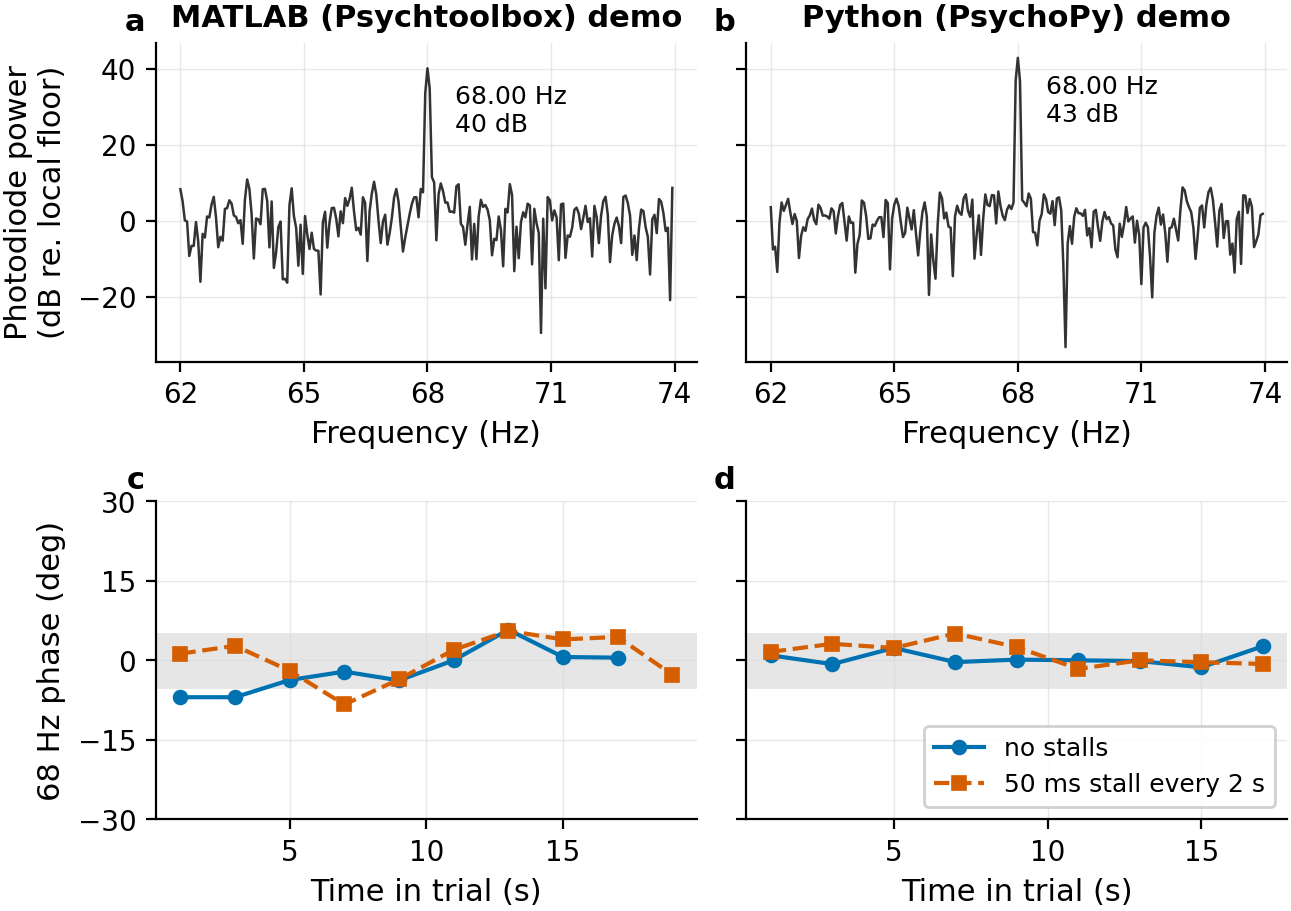
We checked both demos on a PROPixx in QUAD12X mode (1440 Hz greyscale, 960 x 540) with a photodiode over the black strokes of the logo, recorded on a DATAPixx3 analog input at 10 kHz. Each demo ran four 20-second trials. In two of them we deliberately stalled the computer for 50 ms every 2 seconds, forcing 10 to 18 dropped frames per trial, to confirm the clock-driven phase recovers.
Measurement
MATLAB (Psychtoolbox)
Python (PsychoPy)
Tag frequency
68 Hz
68 Hz
Tag power above neighbouring noise
36 - 40 dB
40 - 43 dB
Phase drift across the trial, no stalls
4.9 - 10.4 deg
2.9 - 4.4 deg
Phase drift across the trial, with dropped frames
4.7 - 12.6 deg (10 - 14 dropped)
5.0 - 6.8 deg (18 dropped)
Visible flicker at depth 0.25
None
None
Both demos produce the tag at exactly 68 Hz, and dropped frames do not leave a lasting phase error. Phase drift is the peak-to-peak spread of the tag phase in 2-second windows, after the first 3 seconds of the trial.
In MATLAB the tag phase takes 2 - 3 seconds to settle after the window opens, and wanders slightly more than in Python (about 10 degrees versus 5). Both are small for frequency-tagging analysis, but we recommend discarding the first few seconds of each trial.
Is it working?!
The whole point of RIFT is that the oscillation is invisible. If you see a static grey logo on the display, don’t worry! The code is working. Try changing the stimFreq to a lower value, like 5 Hz, to see the oscillation. If you see a faint shimmer at 68 Hz, check the modulation depth; the demos use 0.25.


.png?cb=bf6c817c2106ed911bd29ce873957477)
.png?cb=ae4c1d72d2f82c47285c4dd63a947f91)
.png?cb=933cbd6e5f443eaf677ec1dd4054ea1c)

.png?cb=89dac74e1aaa4312e0b4586a9a37f2cf)
![[download].](https://vpixx.com/wp-content/uploads/2026/09/logo_960x540.png)