
Overview
The VPixx Device Stress Test is a short test that runs while a VPixx device is connected to your experiment PC. The goal is to validate your GPU/CPU performance and flag any potential performance issues like pervasive frame dropping or dithering.
The test leverages the functionality of VPixx hardware, which has direct access to your video signal from the GPU. It can detect certain display behaviours more precisely than a standard CPU/GPU performance test, and flag issues that may otherwise be overlooked.
The public leaderboard at the bottom of this page collects user-submitted test results for the community and ranks them by performance. The goal is to build a database of known, field-tested systems that can serve as a reference for VPixx users looking to purchase or upgrade their CPU/GPU.
In the spirit of friendly competition, we encourage you to share your name and institution along with your results. This is entirely optional, and you can also submit anonymously if you prefer.
What the Test Measures
|
Field |
Description |
|---|---|
|
Frame drops |
Percentage of frames dropped during the test. Color-coded on screen: green (< 0.1%), yellow (≥ 0.1%), red (≥ 1%). |
|
Dithering detected |
Y/N. Automatically checked when the connected device supports it. What is dithering? |
|
Tested resolution |
e.g. 1920×1080 |
|
Tested refresh rate |
e.g. 120 Hz |
|
Tested bit depth |
e.g. 8-bit, 10-bit |
|
Experiment display |
VPixx device used (VIEWPixx, PROPixx, DATAPixx3 + third-party monitor, etc.) |
|
System info |
GPU, GPU driver, CPU, RAM, OS — auto-detected |
|
Date tested |
ISO date |
|
LabMaestro version |
Auto-populated |
How to Run the Benchmark Test
Before you start:
For results to be meaningful, the benchmark must be run under the same hardware conditions you use for real experiments. Please confirm the following before starting:
-
Minimal background activity (close other applications)
-
No streaming, syncing, or large downloads in progress
-
Plugged into wall power, with battery saver and OS power-saving modes disabled
-
No extra displays connected beyond your research display and any required mirrors
-
If you are using a laptop or PC that has both integrated graphics processing and a dedicated GPU, make sure you are driving the display from the GPU.
Submitted results that do not reflect representative experimental conditions may be rejected during moderation.
Accessing the test:
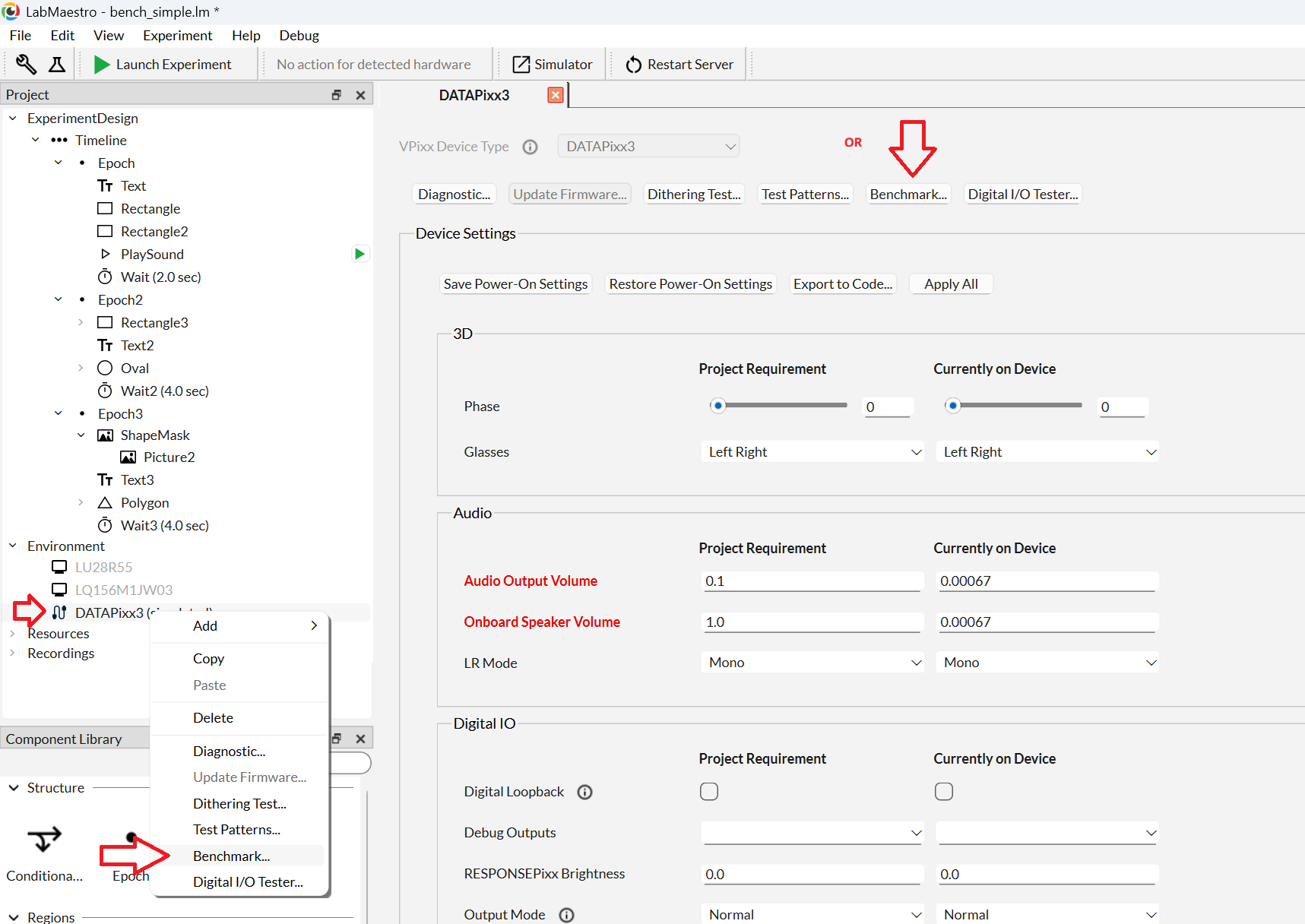
Open the LabMaestro software tool, included free with our software download. Connect and power on your VPixx device. The test can be launched from two places:
-
From the device context menu. In the Project tree, right-click your VPixx device (e.g. DATAPixx3) under Environment and select Benchmark….
-
From the device configuration window. Double-click the device in the Project tree, then click the Benchmark… button at the top of the configuration panel.
Both routes open the same dialogue.
Start the test
When you are ready, press the Start button in the right side of the test dialog. The test should take a couple of seconds to run.
Results
Results display on screen as soon as the test completes. From the results screen you can:
-
Re-run the test (e.g. by pressing Start again)
-
Share to the public leaderboard — see below
If automatic performance metrics are enabled in your LabMaestro settings, results are also logged in our system for general usage metrics.
The stress test intentionally pushes your system to the limit-- some frame drops are normal and expected! If you have concerns about your system performance based on your tests, check out A Scientist's Guide to Frame Droppingfor general advice on how to maximize video output, and what the consequences of dropped frame are for our hardware tools.
Publishing Results to the Leaderboard
We encourage you to share your results with the community. To do so, enter your information (or ‘anonymous’) in the user fields and click “Publish Results”. A copy of your results will be shared with our staff, who will review it and upload it to the leaderboard at the bottom of this page. Under exceptional circumstances, VPixx staff may annotate your results (e.g., to denote a GPU which is no longer available). The results themselves will not be altered.
Multiple Submissions
Testing multiple configurations is highly encouraged. If several entries are submitted from the same exact setup, VPixx staff will determine which are appropriate for the leaderboard.
Leaderboard
View the full interactive leaderboard here.
Benchmark Test Versions
Test versions are identifiable by their LabMaestro software version. As of 1.12.0 we only provide a simple test at 1920 x 1080 @ 120 Hz. Additional tests for specific video modes (3D, 1440 Hz) are planned for future releases. When multiple test versions are available, version notes will be included in this section.
Notes and Limitations
-
VPixx hardware is required. The benchmark requires a connected VPixx device to validate video output to the device (e.g., post-GPU).
-
No frame drops are rare. The workload is intentionally heavy enough to produce some drops on all systems, so frame drops remain meaningful as a ranked metric.
-
Not a general GPU benchmark. This test is not intended to evaluate your CPU/GPU performance, and should not be used to rank systems outside of their use with VPixx hardware.
Questions or Feedback?
Send comments to support@vpixx.com.