
LabMaestro
Breadcrumbs

Expression Reference

Operators

Arithmetic Operators

Addition Operator - +

Syntax

a + b

Compute the sum of a and b.

Examples

  • =1+5

  • =x+1

Relevant in:


Subtraction Operator - -

Syntax

a - b

Compute the difference between a and b.

Examples

  • =4-9

  • =y-50

Relevant in:


Multiplication Operator - *

Syntax

a * b

Computes the product between a and b.

Examples

  • =2*6

  • =val*255

Relevant in:


Division Operator - /

Syntax

a / b

Computes the division of a by b.

Examples

  • =1920/2

  • =trialCount/10

Relevant in:


Parentheses - ()

Syntax

(expression)

Increases the priority of the nested expression. Expressions within parentheses are computed before following the standard priorities of operations.

Examples

  • =(1+20)/3

Relevant in:


Modulo - %

Syntax

a % b

Returns the remains of the division of a by b.

Some programming languages interpret the sign of modulo differently (e.g., Python vs. C++). LabMaestro follows C++ convention:

The floating-point remainder of the division operation x/y calculated by this function is exactly the value x - n*y, where n is x/y with its fractional part truncated.

The returned value has the same sign as x and is less than or equal to y in magnitude.

Examples

  • =21 % 4

Relevant in:


Negation Operator - !

Syntax

!condition

Returns the opposite boolean output for the condition condition.

If condition returns True, !condition returns False, and vice versa.

Examples

  • =!(trialTime > trialTimeLimit)

Relevant in:


Comparison Operators

Equals Operator - ==

Syntax

a == b

Returns True if a and b return the same value. Returns False otherwise.

Examples

  • =x == (y+z)

  • =LastEvent.Key.Value == 'M'

Relevant in:


Not Equal Operator - !=

Syntax

a != b

Returns True if a and b return a different value. Returns False otherwise.

Examples

  • =x != (y+z)

Relevant in:


And Operator - &&

Syntax

a && b

Returns true if a and b both return True. Returns False otherwise.

Examples

  • =(x > 1) && (y < 10)

Relevant in:


Bitwise And Operator - &

Syntax

a & b

Returns 1 if a and b both return True. Returns 0 otherwise.

Examples

  • =5 & 3

Relevant in:

Or Operator - ||

Syntax

a || b

Returns true if a or b returns True. Returns False otherwise.

Examples

  • =(x > 1) || (y < 10)

Relevant in:


Bitwise Or Operator - |

Syntax

a | b

Returns 1 if a or b returns True. Returns 0 otherwise.

Examples

  • =5 | 3

Relevant in:


Greater Than Operator - >

Syntax

a > b

Returns True if a is a higher value than b. Returns False otherwise.

Examples

  • =5 > 3

Relevant in:

Less than Operator - <

Syntax

a < b

Returns True if a is a lower value than b. Returns False otherwise.

Examples

  • =5 < 3

Relevant in:

Greater Than or Equal To Operator - >=

Syntax

a > b

Returns True if a is a higher value than or equal to b. Returns False otherwise.

Examples

  • =5 >= 3

Relevant in:

Less Than or Equal To Operator - <=

Syntax

a <= b

Returns True if a is a lower value than or equal to b. Returns False otherwise.

Examples

  • =5 <= 3

Relevant in:

Conditional Operator

Ternary Operator - ?

Syntax

expression ? ifTrue : ifFalse

Evaluates the condition expression. If expression returns True, the ifTrue expression is evaluated. Otherwise, ifFalse is evaluated.

Examples

  • =trialNumber >= 20 ? stimSize = 50 : stimSize = 20

Relevant in:


Functions

Arithmetic Functions

Absolute Value - abs()

Syntax

abs(x)

Computes the absolute value of x.

Examples

  • =abs(-10)

Relevant in:

Natural Logarithm - log()

Syntax

log(x)

Computes the natural logarithm (ln) of x.

Examples

  • =log(32)

Relevant in:

Base 10 Logarithm - log10()

Syntax

log10(x)

Computes the base 10 logarithm of x.

Examples

  • =log10(100)

Relevant in:

Exponent - pow()

Syntax

pow(a, b)

Returns the value of a to the power of b.

Roots can be implemented as decimal powers

Examples

  • =pow(4, 2)

  • =pow

Relevant in:

Modulo - mod()

Syntax

mod(a, b)

Returns the remains of the division of a by b.

Some programming languages interpret the sign of modulo differently (e.g., Python vs. C++). LabMaestro follows C++ convention:

The floating-point remainder of the division operation x/y calculated by this function is exactly the value x - n*y, where n is x/y with its fractional part truncated.

The returned value has the same sign as x and is less than or equal to y in magnitude.

Examples

  • =mod(21, 4)

Relevant in:

Sign - sign()

Syntax

sign(a)

Returns -1 if a is a negative value; returns 1 if a is a positive value (or 0).

Examples

=sign(-90)

Relevant in:

Reduction Functions

Minimum - min()

Syntax

min(a, b)

Returns the smallest value between a and b.

min() operates on pairs of values. Multiple nested calls can be used to handle larger lists of variables.

Examples

=min(9+8, 9*8)

Relevant in:

Maximum - max()

Syntax

min(a, b)

Returns the largest value between a and b.

max() operates on pairs of values. Multiple nested calls can be used to handle larger lists of variables.

Examples

=min(9+8, 9*8)

Relevant in:

Rounding Functions

*All functions round to the nearest integer

Floor - floor()

Syntax

floor(a)

Rounds decimal number a to the nearest integer smaller than or equal to a.

Examples

=floor(4.8)

Relevant in:

Ceiling - ceil()

Syntax

ceil(a)

Rounds decimal number a to the nearest integer larger than or equal to a.

Examples

=ceil(4.8)

Relevant in:

Round - round()

Syntax

floor(a)

Rounds decimal number a to the nearest integer.

Examples

=round(4.8)

Relevant in:

Trigonometric Functions

*All functions are in degrees

Sine - sin()

Syntax

sin(a)

Computes the sine of angle a.

Examples

=sin(90)

Relevant in:

Cosine - cos()

Syntax

cos(a)

Computes the cosine of angle a.

Examples

=cos(0)

Relevant in:

Tangent - tan()

Syntax

tan(a)

Computes the tangent of angle a.

Examples

  • =tan(45)

Relevant in:

Arcsine - asin()

Syntax

asin(a)

Computes the arcsine of value a.

Examples

  • =asin(1)

Relevant in:

Arccosine - acos()

Syntax

acos(a)

Computes the arccosine of value a.

Examples

  • =acos(1)

Relevant in:

Arctangent - atan()

Syntax

atan(a)

Computes the arctangent of value a.

Examples

  • =atan(1)

Relevant in:

VPixx Devices Functions

TRACKPixx3 Functions

*You must be recording TRACKPixx3 data for these commands to work.

Fixation - fixation()

Syntax

fixation(targetX, targetY, error)

Will return True if a fixation is detected at the target coordinates (targetX, targetY), +/- error. This function returns True only if the subject is currently fixating.

As of Version 1.9, all values are in pixels. This function measures fixations. Consider checking that the fixation flag is also high whenever a true fixation within the region of interest is required.

Examples

  • =fixation(0, 0, 100)

Relevant in:

Fixation (Without location information) - isFixating()

Syntax

isFixating()

Will return True if the subject is currently fixating.

Relevant in:


Gaze Position - gazeAt()

Syntax

gazeAt(targetX, targetY, error)

Will return True if the participant’s gaze is centred at the target coordinates (targetX, targetY), +/- error.

As of Version 1.9, all values are in pixels. This function is based on the current gaze location. It does not matter if the gaze is fixed or moving.

Examples

  • =fixation(0, 0, 100)

Relevant in:

Global Objects

LastEvent

A general component that stores the absolute last input event recorded during the experiment.

Shares the same structure and properties as WaitForInput.LastEvent. The difference is that WaitForInput stores the LastEvent for that specific command, which is time-bound and is not overwritten.

Calling LastEvent directly will invoke the general component, which is not time-bound and is overwritten with each new input.

FrameNumber

The current frame number since the experiment was launched. Can be used to present or calculate a stimulus at specific frames or frame intervals. Only increments when a frame is successfully presented. Available from LM 1.10 onwards.

Time

Time, in seconds, since the experiment was launched. Uses double precision.

Display

Component for the main experiment display. This is available when a display is assigned to the project. If more than one display is assigned to the project, Display refers to the display in the Environment with the (main) descriptor beside it:
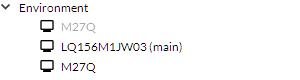
image-20250324-205520.png
Example of a multi-display project. The Display component points to the display with the (main) descriptor.

As of release 1.10, Display has the following properties. Most of these properties are determined by metadata provided by the display manufacturer. Some of these properties, including Pixels Per Inch and Viewing Distance, can be edited by the user by double-clicking on the display in the Project pane.

See Monitor Pixel Density and Degrees of Visual Angle for more details.

Property

Type

Description

Name

String

The name of the display

ViewingDistance

Float

The distance between the participant’s eyes and the center of the display, in centimetres. Default value is 57.3.

Width

Float

The display’s physical width in centimetres.

Height

Float

The display’s physical height in centimetres.

BitDepth

Int

The display bit depth, in bits per colour

RefreshRate

Float

The display refresh rate in Hz. Note that, due to how it is calculated, it is not unusual for this value to have several decimal places.

PixelsPerInch

Float

The display’s pixel density, in pixels per inch.

Tracker

Component for the TRACKPixx3. This is available whenever a TRACKPixx3 is added to a project. Note that only one TRACKPixx3 can be used at a time, and the component name is always ‘Tracker.’

Currently, Tracker has the following properties:

Property

Type

Description

isAwake

Boolean

Returns true if Tracker is awake, false otherwise

gazeX

Float

Current average X position of the left and right eyes. Uses the VPixx coordinate system (Cartesian and in pixels, where 0,0 is the center of the screen). If a single eye is tracked, gazeX reports the x-position of that eye. Note that this value updates at an approximate rate of 15 - 20 Hz and should only be used for online experiment management, not for offline data analysis.

gazeY

Float

Current average Y position of the left and right eyes. Uses the VPixx coordinate system (Cartesian and in pixels, where 0,0 is the center of the screen). If a single eye is tracked, gazeY reports the y-coordinate of that eye. Note that this value updates at an approximate rate of 15 - 20 Hz and should only be used for online experiment management, not for offline data analysis.

More properties will be added in future releases.

TrialNumber

An integer that keeps track of the number of trials executed so far. Only available when using a Method (e.g., Constant Stimuli).

ExperimentDesign

Variables defined in the ExperimentDesign of your experiments can be used directly in an expression. For example, you can use =SubjectID directly to display it on screen.

You can also create your own variables to access them in the code. The ‘Ask’ must be set to Yes for the value to be accessible as a property. In the picture below, you would be able to access SubjectId, ExperimentId, RandomSeed, and Hello directly in expressions.
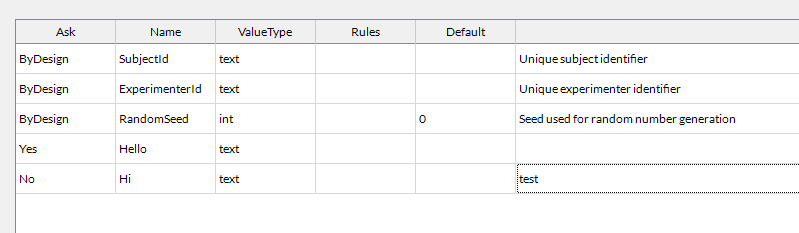
image-20250417-195716.png
ExperimentDesign example to know how to use variables in expressions
Remote

When running a LabMaestro experiment, you can call the Pack&Go API from the remote object. If the Pack&Go server cannot be reached, 0 is returned. API functions are available as properties of this object, following the syntax below:

Currently, Remote has the following properties:

Property

Type

Description

colordepth

Integer

Returns the participant monitor’s colour depth.

framesdropped

Integer

Returns the number of dropped frames during the experiment session.

heightcm

Real

Returns the participant’s monitor height in centimetres.

heightpx

Real

Returns the participant’s monitor height in pixels.

lastframedelay

Real

Returns the frame delay in seconds.

networklatency

Real

Returns network latency in seconds.

ppi

Real

Returns the number of pixels per inch on the participant’s display.

videoheightcm

Real

Returns the height of the video feed in centimetres.

videowidthcm

Real

Returns the width of the video feed in centimetres.

widthcm

Real

Returns the participant’s monitor width in centimetres.

widthpx

Real

Returns the participant’s monitor width in pixels.

More properties will be added in future releases.