Logging Digital Inputs and Outputs with the DATAPixx3's Digital Scope
The DATAPixx3 Gen 2(with firmware revision 29 or higher), from VPixx Technologies Inc., includes a feature to log any transitions in the Digital Input and Digital Output channels, at a rate of 1 MHz (1,000,000 samples per second), within a single log. We call this feature Digital Scope. This tool makes synchronization of stimulus-based triggers (e.g. using our Pixel Mode feature) and subject responses, via our RESPONSEPixx response pads, extremely convenient and simple; using our software APIs (for MATLAB or Python) or our LabMaestro software, you simply need to set a Digital I/O recording log, specifying that you would like to log both digital inputs and outputs using Digital Scope mode, start the recording log, and then read the logged data.
In Python, the logged data are returned in a 3-column array of values:
The first column contains the microsecond precise time-stamps of transitions detected on either the Digital Inputs or Outputs.
The second column contains the logged Digital Input values corresponding to the time-stamps in the first column.
The third column contains the logged Digital Output values corresponding to the time-stamps in the first column.
In Matlab, the logged data are in 2 separate arrays: a 2D array contains the logged Digital Input values and logged Digital Output values, in their respective columns; and a 1D array contains the time stamps corresponding to the logged Digital Input/Output values in the first array.
Therefore, any time there is a transition in either the Digital Inputs or the Digital Outputs, there will be a new entry/row in the log, with the time-stamp, the Digital Input state and the Digital Output state recorded.
The following are instructions for how to enable/disable Digital Scope mode in our Matlab/PsychToolBox and Python/PsychoPy APIs.
In Matlab, when you prepare/set the Digital Input log for a recording, you can simply specify whether you would like to use the new Digital Scope mode (logging both Digital Input and Output) or the classic Digital-Input-only logging, by setting the “mode” argument.
MATLAB Example
MATLAB
%The Datapixx('SetDinLog') command contains a 'mode' argument for enabling/disabling DIO48
%Datapixx('SetDinLog' [, bufferBaseAddress=12e6] [, numBufferFrames=1000] [, mode=0)

%To use Digital Scope mode (log both digital inputs and outputs), you must set the 'mode' argument to 1.
%To only digital inputs, you must set the 'mode' argument to 0, for 'classical' DIN logging

Datapixx('SetDinLog',[],[],1);  % Enable Digital Scope logging
Datapixx('RegWrRd');

Datapixx('StartDinLog')
Python example
Python
import pypixxlib._libdpx as dp

# Set up new log with new argument
dp.DPxOpen()
dinLog = dp.DPxSetDinLog(buffBaseAddr = 12000000, numBuffFrames = 1000, mode = 'Full')
dp.DPxUpdateRegCache()
dp.DPxGetDinStatus(dinLog)
print('Mode is ', dp.DPxIsDinDio48())
#Initial state
print(dinLog)

dp.DPxStartDinLog()
dp.DPxUpdateRegCache()
Digital Scope demo: Logging Pixel Mode Triggers and REPONSEPixx button presses for response time measurements
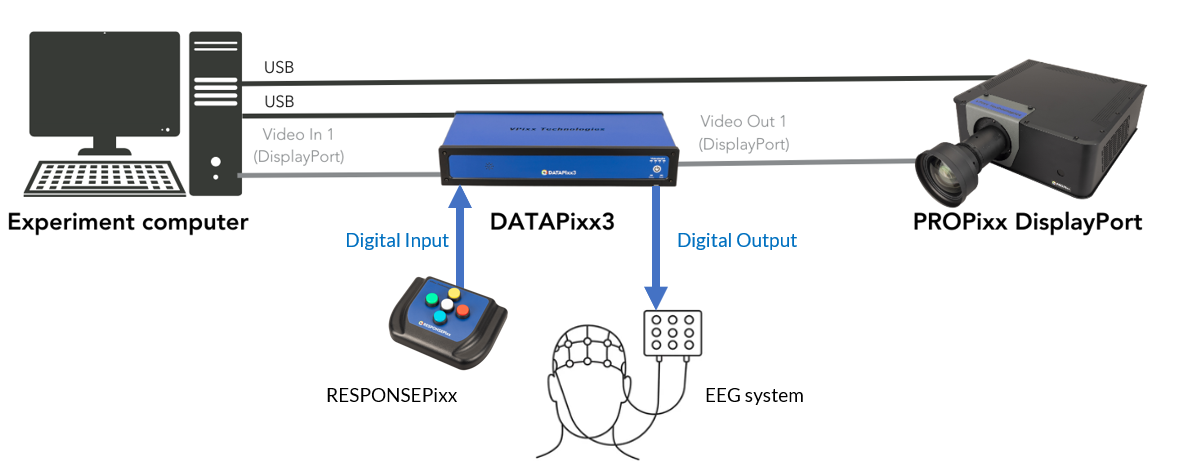
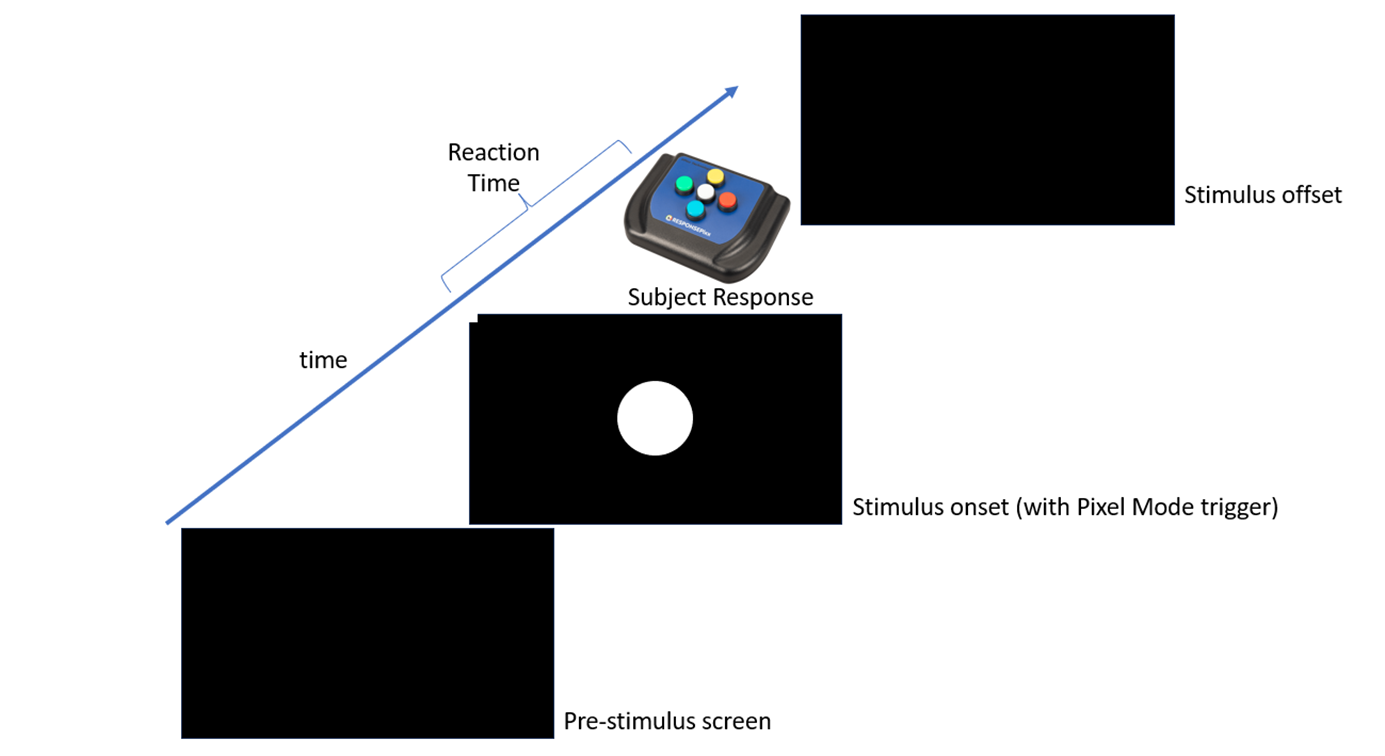
To illustrate how Digital Scope can be used in a real use-case, consider a situation in which a researcher has a DATAPixx3 and is driving one of our displays (e.g. the PROPixx projector). In their experiment, they wish to send Pixel Mode triggers from the DATAPixx3’s Digital Outputs to an EEG recording system, to mark in their recordings the precise moment the stimulus appears (the stimulus onset); furthermore, they have a RESPONSEPixx response pad connected to the DATAPixx3’s Digital Inputs to record button press events from the subject. Their goal is to record the button press events and compare their timing relative to the stimulus onsets, with the intention of computing microsecond-precise reaction times to the stimuli. To do this in the an efficient, and elegant manner, they could start a single Digital I/O recording log, to log all transitions/state changes in both the Digital Input and Digital Output channels.
First, to configure the DATAPixx3 to output Pixel Mode triggers, see the following resource: Sending Triggers with Pixel Mode | Enabling Pixel Mode on VPixx hardware . With Pixel Mode enabled, the researcher draws a specific color/RGB value into the top-left pixel to control the states of the 24-bit Digital Outputs, sending a unique trigger to mark the onset of their stimulus.
An illustration of an example experiment where the stimulus onset (Pixel Mode trigger on digital outputs) and subject response is logged with DIO48
The following is a demo for how you would configure the DATAPixx3 to log both Digital Inputs and Outputs, start the logging, and how to retrieve the newly logged data; the example also contains the generation of Digital Outputs via Pixel Mode, when displaying a stimulus (e.g. a white circle over a black background ), and reading of RESPONSEPixx inputs in real time, to compute a reaction time to the stimulus (the stimulus onset time subtracted from the response time):
MATLAB Example
MATLAB
% VPixx Response Time Task with Pixel Mode Demo
AssertOpenGL;
KbName('UnifyKeyNames');
Screen('Preference', 'SkipSyncTests', 1)

% 1. Initialize DATAPixx Device
Datapixx('Open');
Datapixx('StopAllSchedules'); %stop any ongoing schedules
Datapixx('StopDinLog'); %stop any ongoing DIN Logs
Datapixx('EnableDinDebounce');      % Filter out button bounce
Datapixx('EnablePixelMode'); % Turn on pixel mode for hardware triggers
Datapixx('RegWrRd');


% 2. Open Psychtoolbox Window
screenNumber = max(Screen('Screens'));
[windowPtr, rect] = PsychImaging('OpenWindow', screenNumber, 0);

% Define trigger values based on the VPixx Pixel Mode mapping
% Color mapping translates [R, G, B] into a 24-bit digital output channel value

triggerOnset = [255, 255, 255];   % Turn on specific TTL channels; in this case, all channels high

% Define trigger pixel location (Top-Left: 1x1 pixel box)
pixelLocation = [0, 0, 1, 1];

Datapixx('SetDinLog',[],[],1); %Enable Digital Scope logging
Datapixx('StartDinLog');
Datapixx('RegWrRd');

WaitSecs(1); % Wait one second; pre-stim duration

% 3. Present Stimulus and Fire Hardware Trigger
% The moment this frame passes to the VPixx hardware, the TTL trigger fires.
Screen('FillOval', windowPtr, [255 255 255], CenterRectOnPoint([0 0 100 100], rect(3)/2, rect(4)/2));
Screen('FillRect', windowPtr, triggerOnset, pixelLocation); % Clear trigger pixel
Screen('Flip', windowPtr);

% 4. Poll for Response
disp('Waiting for a response... Press any key.');
rt = 0; %initialize reaction time variable
pressed = false;
data = []; %initialize an array for DIO48 data
timestamps = []; %initialize an array for DIO48 timestamps

    while ~pressed
        % Read the latest Din log status
            Datapixx('RegWrRd');
            status = Datapixx('GetDinStatus');

            %check for any new log entries (can be button presses or new
            %triggers)
            if status.newLogFrames > 0
                % Fetch newly logged transitions
                [newdata, newtimestamps] = Datapixx('ReadDinLog')
                %append new data and timestamps to their respective arrays
                data = [data newdata];
                timestamps = [timestamps newtimestamps];
                %if button press was detected (any of the 24 DINs are low)
                %exit the loop to finish the trial
                if newdata(1) ~= 16777215 %this value is 24-bits high in decimal
                    pressed = true;
                end
            end

        end
        WaitSecs(0.001);

    % Print results
    if pressed
        fprintf('Response detected!');
    end

    %compute reaction time
    %find index of DOUT data, data(2,:) where the white pixel mode trigger was first
    %detected
    index = find(data(2,:) == 16777215, 1); %look for first instance where all 24 output bits are high
    %use the index to get the timestamp of the pixel mode trigger
    pixmode_trigger_time = timestamps(index);

    %find index of DIN data , data(1,:) where the a button press was
    %detected i.e where any of the 24 input bits are not high
    index = find(data(1,:) ~= 16777215, 1);
    response_time = timestamps(index);

    rt = response_time - pixmode_trigger_time; %calculate reaction time
    fprintf('Your reaction time is %f seconds', rt);

% 5. Clean up Hardware States
Datapixx('StopDinLog');
Datapixx('DisablePixelMode');
Datapixx('RegWrRd');
Datapixx('Close');
sca;
Python example
Python
#VPixx Response Time Task with Pixel Mode Demo
import pypixxlib._libdpx as dp
from psychopy import visual, core
import numpy as np

# Set up new log with new argument
dp.DPxOpen()
dp.DPxStopDinLog()
dp.DPxEnableDinDebounce()
dp.DPxEnableDoutPixelMode()
dp.DPxUpdateRegCache()

#Open PsychoPy Window
win = visual.Window(
        screen = 1, # change here to 1 to display on second screen!
        monitor = None,
        fullscr=True,
        pos = [0,0],
        color='black',
        units = "pix"
        )

pixelLocation = [-win.size[0]/2, win.size[1]/2]
pixelColor = [1, 1, 1]

# Start the log
dinLog = dp.DPxSetDinLog(buffBaseAddr = 12000000, numBuffFrames = 1000, mode = 'Full')
dp.DPxStartDinLog()
dp.DPxUpdateRegCache()

#Draw the stimulus and Pixel Mode trigger
#draw stim
circle = visual.Circle(
    win=win,
    radius=50,       # Radius of the circle
    pos=(0, 0),      # Center of the screen
    fillColor='white',
    lineColor='white'
)
circle.draw()

#draw Pix Mode Trigger
line = visual.Line(
            win=win,
            units = 'pix',
            start=pixelLocation,
            end=[pixelLocation[0]+2, pixelLocation[1]+2],
            interpolate = False,
            lineColor = 'white')
line.draw()

win.flip()

#initialize reaction time variable and data array for Digital Scope data
rt = 0.0
pressed = False
data = []

#wait for button press, keep logging any new frames, exit loop when button press is detected

while not pressed:
    # read device status
    dp.DPxUpdateRegCache()
    dp.DPxGetDinStatus(dinLog)
    newEvents = dinLog["newLogFrames"]
    # check for new data entries, and append them to the data array
    if newEvents > 0:
        eventList = dp.DPxReadDinLog(dinLog, newEvents)
        data = data + eventList
    #if a button is pressed exit the loop to finish the trial
        if eventList[0][1] != 16777215:
            pressed = True

#look for the first instance of the Pixel Mode trigger, all 24 DOUT bits high
#and extract the timestamp
doutData = [sublist[2] for sublist in data]
index = doutData.index(16777215)
pixMode_timestamp = data[index][0]

#look for the first instance of a button press, any of the 24 DIN bits low
#and extract the timestamp
dinData = [sublist[1] for sublist in data]
index = next((i for i, v in enumerate(dinData) if v != 16777215), None)
response_timestamp = data[index][0]

#compute the reaction time from the response and pixel mode timestamps
rt = response_timestamp - pixMode_timestamp

print(f"your reaction time is {rt} seconds")

# Stop logging
dp.DPxStopDinLog()
dp.DPxUpdateRegCache()
dp.DPxDisableDinDebounce()
dp.DPxDisableDoutPixelMode()
win.close()
core.quit()
In the above demo, we demonstrated how to use Digital Scope to simultaneously log Digital Inputs and Outputs, on a singular VPixx device, so that the timestamps of logged Digital Input and Output events can be easily extracted and compared against one-another (e.g. for computing reaction times).
Note, there are many other applications for logging Digital Outputs, in addition to Inputs, on our devices. In a companion VOCAL article, we review how Digital Scope can be used to log a synchronization pulse, sent from the DATAPixx3 at regular time intervals (e.g. once every second) to peripheral recording devices (e.g. EEG, MEG-OPM etc.), in order to keep the multiple data-streams in synchronization, getting around the potential issue of clock drift between multiple systems with their own hardware clocks.