
Many experiments now record from several systems at once: EEG or MEG, an eye tracker, a response box, a display.
Our guide Synchronization Strategies for Multimodal Neuroscience showed how to send event markers between systems to share event timing. Markers tell you when an event happened, but they cannot keep continuous recordings aligned between events.
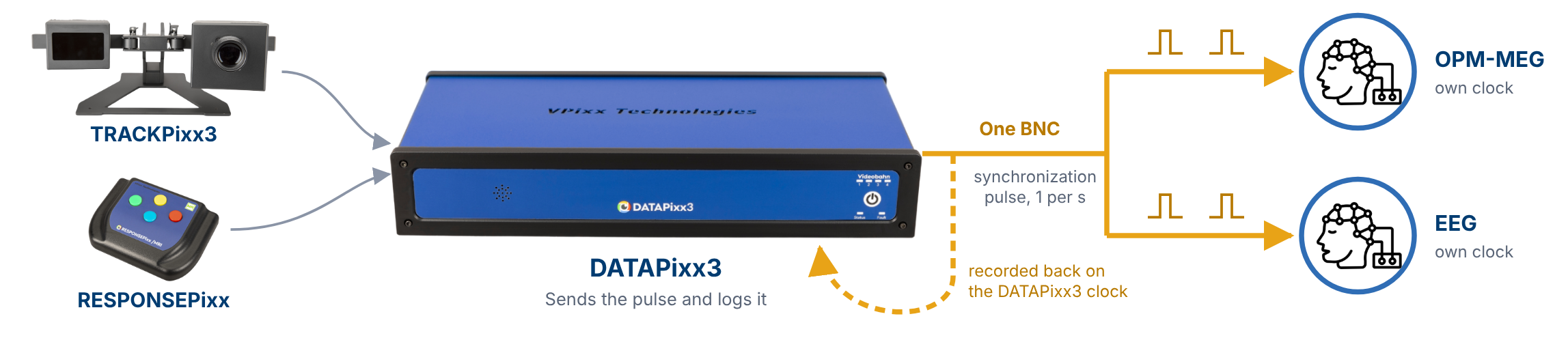
This guide addresses continuous data stream alignment. The premise is simple; a single repeating synchronization pulse is sent to every recorder, including the system generating it. After the session, this pulse in each data stream allows you to align all signals to a single timeline.
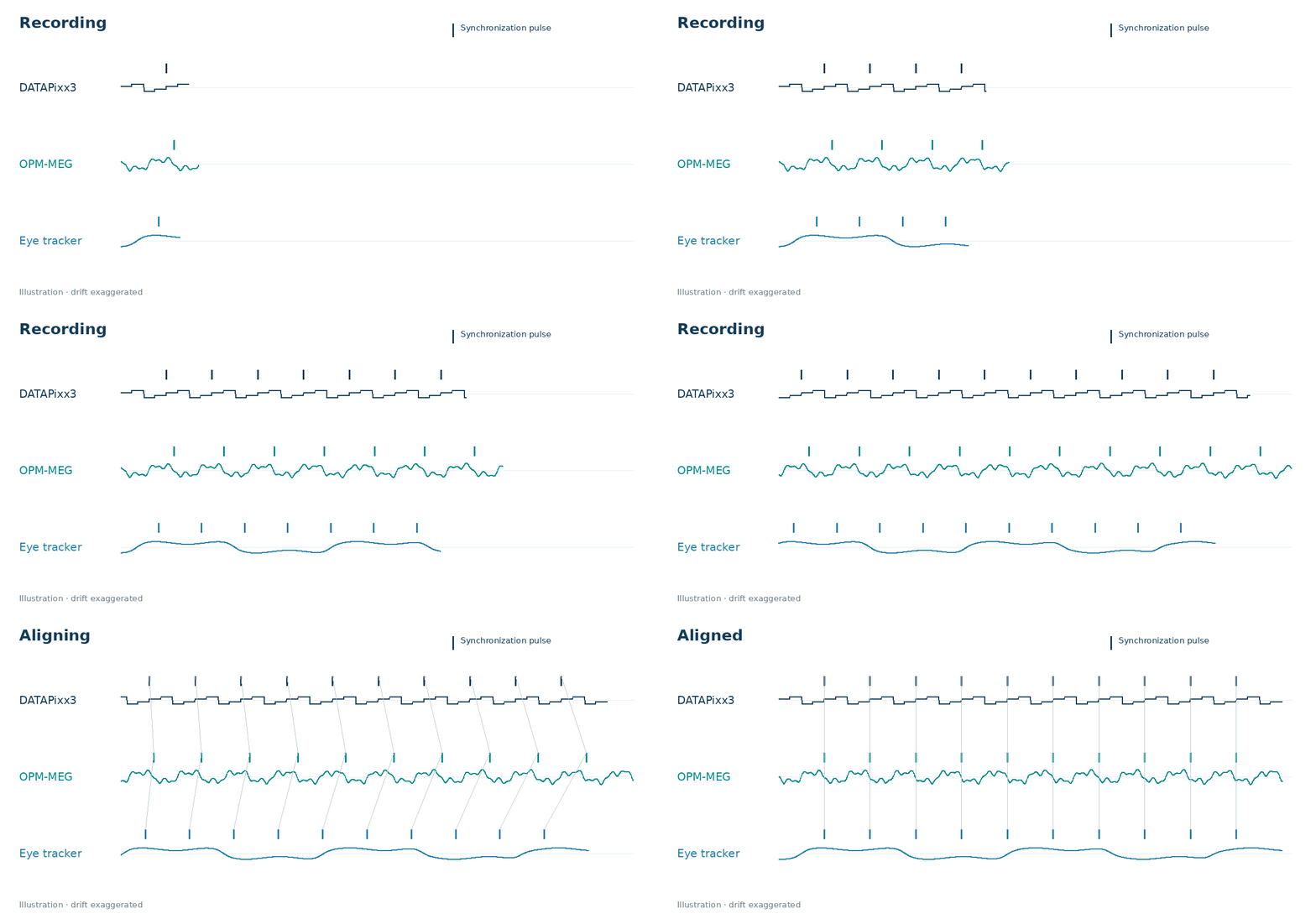
The advantage of multiple aligned streams
VPixx hardware is often used to forward signals to other systems. Button presses, logged eye tracking, and triggers are passed to a receiver, be it an EEG amplifier, an MEG system, or some other third-party recording equipment.
This method collapses multiple data acquisition streams into a single master data stream, which is a reasonable approach. It also introduces a limitation: the number of signals the master data stream can handle is set by its own input channels, and signal resolution is set by the data stream's sampling rate. Even digital signals, which execute near instantaneously, get throttled to the sampling rate of the receiver (e.g., 600 Hz).
As of summer 2026, we have released a new utility called Digital Scope, which is an extension of our digital input log. Digital Scope allows researchers to use the DATAPixx3 as a recording stream that complements other acquisition systems rather than simply feeding them.
|
Records |
Digital Input log |
NEW Digital Scope log |
|---|---|---|
|
Changes in first 16 digital inputs |
|
|
|
Changes in last 8 digital inputs |
|
|
|
Changes in all 24 digital outputs |
|
|
With this method, you can leverage multiple recording systems working in parallel, as opposed to one single master data stream, without sacrificing temporal precision.
All hardware clocks differ slightly in their timing, due to differences in their crystals. Differences are typically expressed in ppm, or parts per million. Relative timing differences between clocks in the range of +/- 50 ppm is not uncommon.
In practice, that means that data streams on different clocks drift with respect to each other over time. Consider two events logged every two seconds on clock 1, which has a +50 ppm difference compared to clock 2:
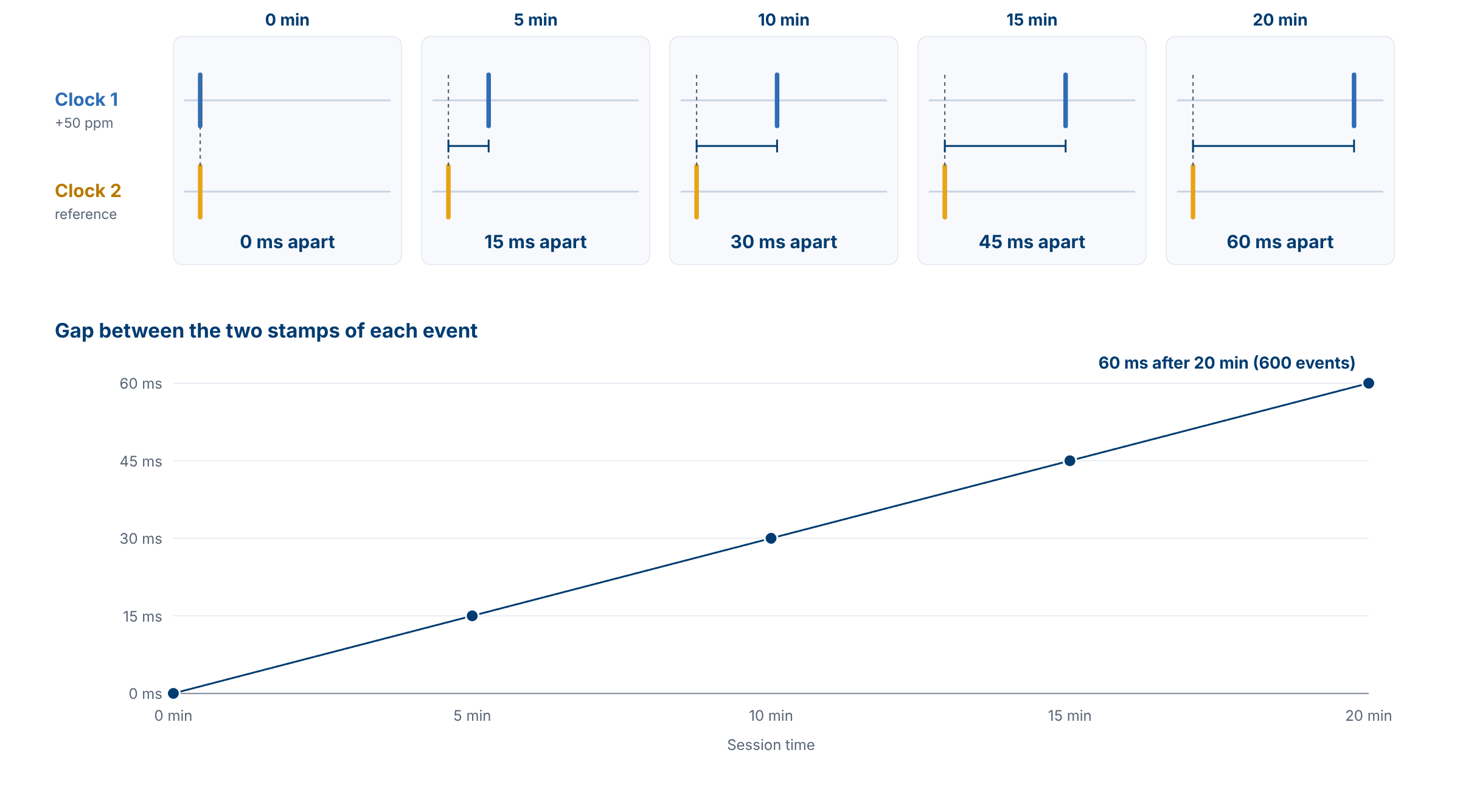
Repeating synchronization pulses often allows for piecewise remapping of signals to frequent events. This eliminates drift that can add up when you use one-off event-alignment triggers that are spaced far apart.
While short trials and trigger-locked events like ERPs may not see a major difference compared to single alignment markers, longer blocks and time-series analyses like frequency tagging coherence analysis benefit a great deal from the correction.
General steps
Here is the general step-by-step process for generating a cross-system synchronization pulse:
-
Generate the pulse on the DATAPixx3 using the DOut schedule. A digital output, or Dout, schedule drives one output channel high for 30 ms, once per second. A triple beat marks the block onset, and a double beat logs the block end, automatically creating block epochs.
The exact pulse times and onset/offset signatures are entirely up to you. We recommend a pulse once per second (1 Hz) or less.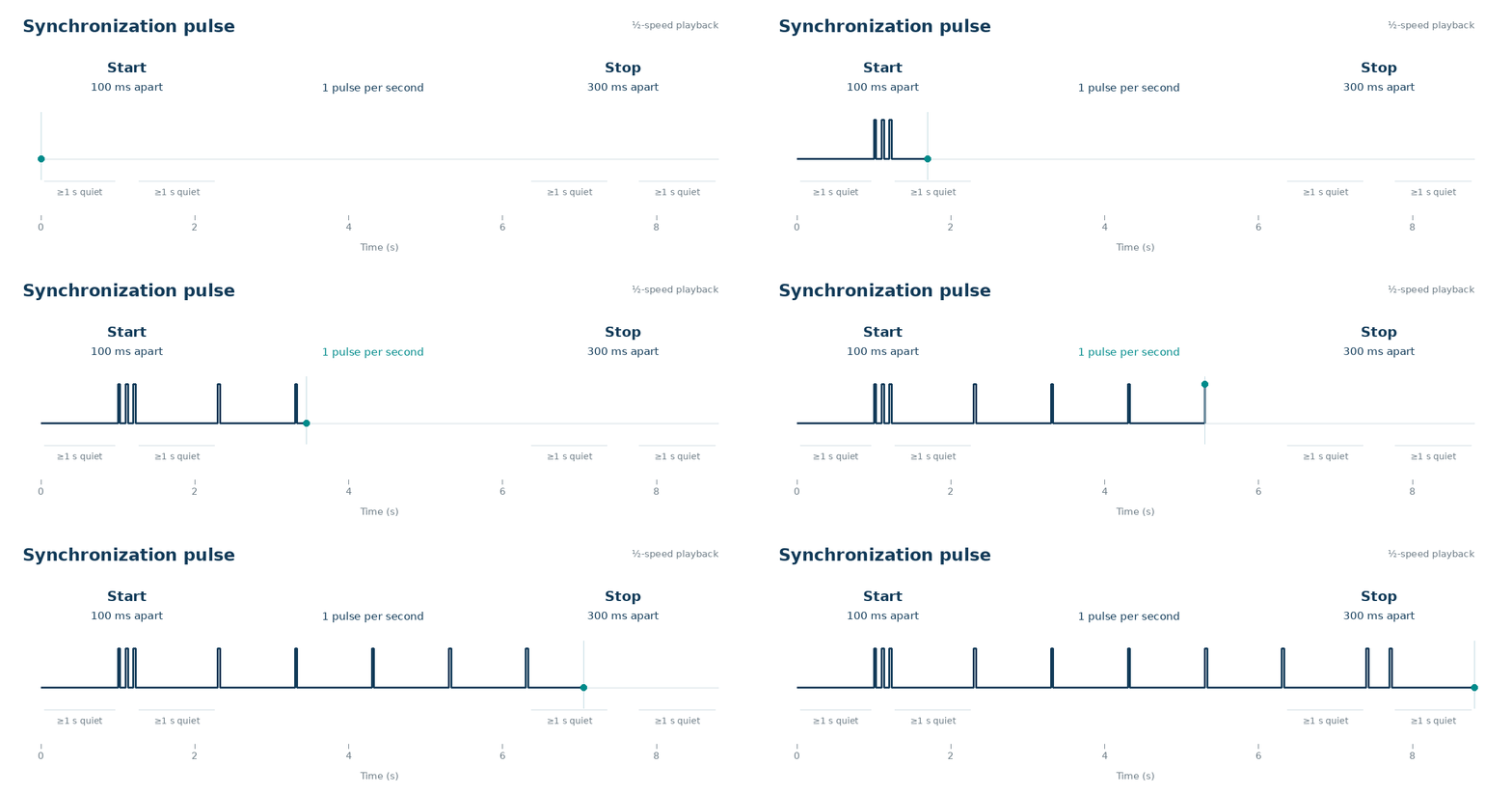
-
Connect that digital output to every external recorder. Connect a cable from the DATAPixx3 digital output channel to the receiver’s own TTL input.

-
Log events on the DATAPixx3. Use Digital Scope to record all 24 digital inputs and 24 digital outputs on the DATAPixx3 clock at a 1,000 kHz sampling rate. This data stream captures the synchronization pulse. It can also capture RESPONSEPixx button presses and other digital inputs like MRI triggers, and can record Pixel Mode video triggers and manual event triggers previously treated as output-only.
This same hardware records TRACKPixx3 eye tracking data, analog inputs, and microphone/audio inputs. Users can nominally synchronize analog and audio playback to video events using pixel sync, and save a digital output or Pixel Mode trigger on the same video frame to mark the playback time precisely -
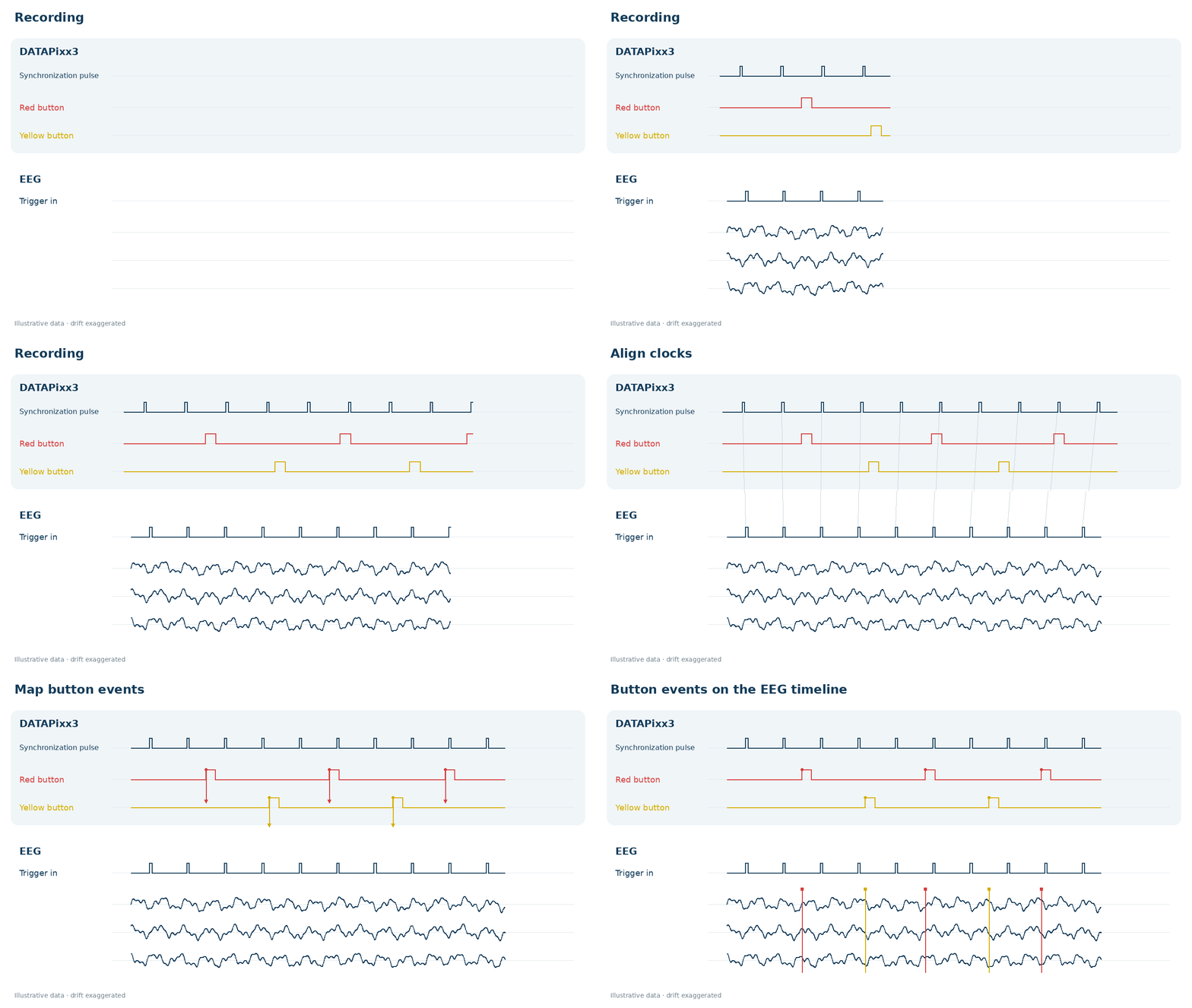
Fit the clocks after the session. Pair each pulse in the DATAPixx3 log with the same pulse on each recorder, fit the offset and drift, and map any event time from one clock to another.
-
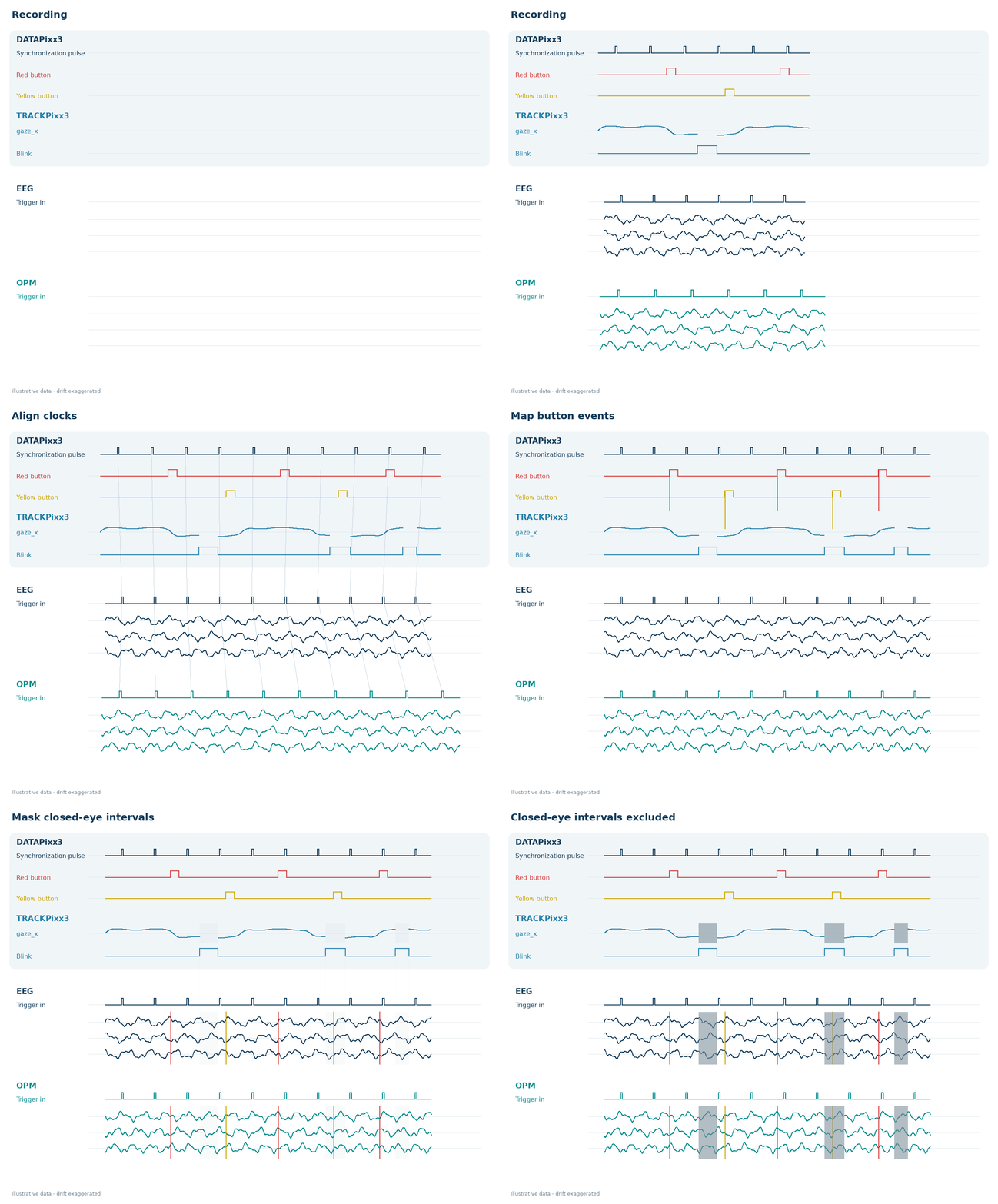
Rinse and repeat. Add additional data streams via a split synchronization cable, and align all streams from the DATAPixx3 and other acquisition systems together in post-processing. Below is an expanded example that adds TRACKPixx3 gaze and blink flags on the DATAPixx3 stream, and acquisition on a second OPM-MEG system.
The animation below shows the stream alignment and how the TRACKPixx3 blink flags can be used to mask closed-eye instances in the neural trace.
The practical gain in signal strength
The above alignment method was used to align a rapid frequency-tagging reference signal timestamped on the DATAPixx3, with a neural recording on a dry-EEG headset (see our ECVP poster; paper in prep).
The two clocks differed by a highly consistent 49.3 ppm. Coherence analysis on the drift-corrected signal timing resulted in an 11-fold increase in statistical significance on a 2-minute trial.
There is a very real advantage to aligning streams as precisely as possible for these studies, and others where time-series analyses cross multiple recording systems.
Example code
Some DATAPixx3 units purchased before 2023 will need new firmware that has not been released yet. If you get an error trying to enable Digital Scope on your unit, please contact support@vpixx.com.
The VIEWPixx3 /OLED also supports Digital Scope but not digital output schedules; pulse trains must be driven manually or by Pixel Mode.
Below are examples using our APIs for Python (pypixxlib) and MATLAB/Psychtoolbox (Datapixx.mex), showing how to start the log, generate the start and stop markers, and play a continuous pulse train during a block.
Aligning the data in post-processing
Below is a simple example of how to align data in post-processing. You need two files: the Digital Scope log and your EEG trigger channel, exported as one value per sample.
Toy versions of both data files can be downloaded [here] as .csv, so you can run the code and see results before recording anything. Download the file and unzip it into the same folder as your scripts.
The alignment method follows six discrete steps:
-
Find the pulses. In each recording, find the moment each synchronization pulse switches on. On the DATAPixx3 these times come from the Digital Scope log. On the EEG they come from the trigger channel.
-
Find the beats. Pulses less than half a second apart belong to one beat. Three pulses 100 ms apart mark the start of a block, and two pulses 300 ms apart mark the end.
-
Line up the start. Matching the first start beat on the EEG with a start beat in the DATAPixx3 log gives a first estimate of the offset between the two clocks.
-
Match the pulses outward. From that starting point, predict where each DATAPixx3 pulse should appear on the EEG and take the EEG pulse within 10 ms of that spot. The code refits a straight line, offset plus drift, each time the window widens, until the whole recording is covered.
-
Check the result. Rather than return a wrong answer, the code stops with an error if the EEG matches two blocks equally well, if fewer than 10 pulses match, or if the drift is implausibly large. Otherwise, it reports how many pulses matched, the drift in parts per million and the pulse-fit residual.
-
Move events between clocks. To place a button press on the EEG clock, the code interpolates between the matched pulses on either side. Times outside the recording, or inside a gap of more than 2.5 s with no pulses (for example, between blocks), return NaN rather than a guess.
With the toy data, the EEG clock reads 7.3 s ahead of the DATAPixx3 clock, runs 40 ppm fast, and missed one pulse. The output should read:
matched 159 of 160 DATAPixx pulses in 2 part(s); drift +39.73 ppm; pulse-fit residual rms 0.289 ms, max 0.518 ms
button at   12.250 s on the DATAPixx3 =   19.551 s on the EEG
button at   30.875 s on the DATAPixx3 =   38.177 s on the EEG
button at   47.500 s on the DATAPixx3 =   54.802 s on the EEG
button at   95.125 s on the DATAPixx3 =  102.429 s on the EEG