
Introduction
From LabMaestro Version 1.11 onwards, you can easily deploy and run LabMaestro experiments on the VPixx Pack&Go platform to run online experiments. This page will guide you through the necessary steps to link your application to your Scientist Portal account.
Prerequisites
-
Have LabMaestro installed and activated.
-
Have an account on the VPixx Scientist Portal and link it with LabMaestro.
-
Have sufficient credits to run an online experiment.
You can register here if you do not have a VPixx account.
Uploading your experiment to Pack&Go via LabMaestro.
If you have a LabMaestro project you would like to run online, you can upload it directly from the application to the Pack&Go platform. While the project you wish to upload is open, go to the Remote Experiments panel and press the Create a new experiment button, shown below.
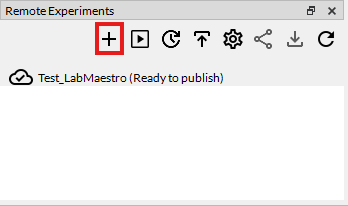
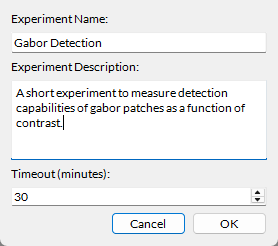
Clicking on this button will open a contextual window in which you must specify some information:
-
Experiment Name: The name with which you upload your experiment to Pack&Go.
-
Experiment Description: A small description of your experiment, only visible to you.
-
Timeout (minutes): The time allowed for participants to complete the experiment. Capped at 60 minutes unless you enable extended duration directly from Pack&Go.
Experiments run online on VPixx Pack&Go require credits to be launched. Refer to this page for more detailed information on pricing, buying credits for your account, and credit use during experiments.
Once you have entered this information, your experiment will be uploaded to Pack&Go. This process may take from a few seconds to a couple of minutes, depending on your internet connection and the Pack&Go server status.
Managing your experiment directly from LabMaestro.
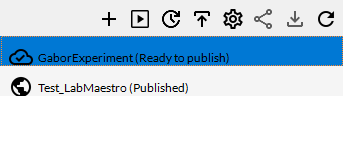
Once you have successfully uploaded your experiment, you can access additional options from the Remote Experiments panel. From left to right, these options include:
-
Create New Experiment: This button prompts you to create a new experiment on Pack&Go.
-
Test Experiment: This will launch a test run of your experiment. Test runs do not consume credits. Please use this function extensively before publishing an experiment.
-
Update: Use this button to update the .lm file underlying your experiment. Useful if, after testing your experiment, you notice bugs or problems and wish to upload a fix. You cannot access this function after publishing your experiment. Please ensure that you have thoroughly tested your experiment before publishing it.
-
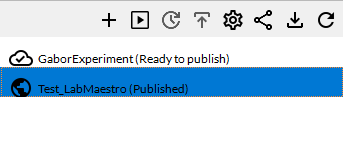
Publish: This button will prompt you to publish your experiment through the Scientist Portal. Once you have published your experiment, this option will become grayed out.
-
Manage Experiment: Use this button to open the experiment page on the Scientist Portal. You can edit some information if your experiment has not yet been published. If your experiment is published, you can access your results and create invites.
-
Create Invites: This button opens the Scientist Portal, allowing you to manage invite links for your experiment. Please refer to this page for more information on invite links and general management of a published experiment.
-
Download: This button lets you download the .lm file for your experiment, hosted on the Pack&Go servers. This file includes your results, if applicable. If you wish to analyze your data using LabMaestro's built-in data visualization tools, you will need to download the .lm file after data collection.
-
Refresh. Refresh the Remote Experiment window to sync experiment status with your scientist portal.
Important Considerations with Online Experiments
To ensure your online experiment runs smoothly and to confirm that your experiment design is suitable for an online study, we recommend following the guidelines on the Best Practices for Designing and Implementing Pack&Go Studies page. Notably, online experiments come with certain limitations regarding timing and stimulus presentation. In most cases, thorough testing of your experiment before publication should ensure you do not run into unexpected issues.
Related Links
Best Practices for Designing and Implementing Pack&Go Studies