
Overview
This page explains how to export your LabMaestro Experiment data, including the available formats and configurations. Once exported, you can easily analyze your data in the third-party software of your choice (e.g., MATLAB, Python, R).
Before you begin, you should:
-
Have LabMaestro installed and activated
-
Have experiment data you wish to import (or use a Template Experiment)
Exporting your Data
To export your experiment data, right-click on Recordings in the Project panel. From the menu, select Export.
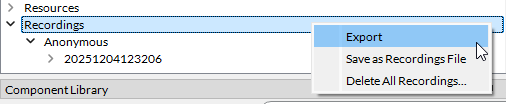
Upon selecting this option, a contextual window will open, with the following options:
-
Structure: The format of your data structure. As of Version 1.11, the BIDS structure is supported.
If you would like future versions of LabMaestro to support a specific data structure, please get in touch with our support team at support@vpixx.com.
-
Meta Format: The file format for metadata files. As of Version 1.11, the JSON format is supported.
-
Data Format: The file format for data files. As of Version 1.11, *.tsv and *.csv files are supported.
-
Include Anonymous Sessions: Select this option if you wish to include Anonymous sessions in your dataset.
-
License: Text field to enter the license you use for use and sharing permissions.
-
Dataset Links: Enter the links where you intend to host your dataset, if any.
-
Acknowledgements: List all relevant acknowledgements.
-
How to Acknowledge: Text field to enter instructions relative to dataset use, citation and acknowledgement.
-
Funding: Enter the sources of funding for your research project, if any.
-
Ethics Approval: Enter the information relevant to ethics for your project (e.g. ethics board that approved the project, certificate ID, etc.).
-
References and Links: Enter the relevant links and references (ex. research group website, publications presenting/using the dataset).
-
Dataset DOI: Enter the DOI of your dataset, if any.
-
Authors: List the authors involved in the publication of this dataset.
Exported Files
Once you have exported your data, your file explorer will automatically open at the export location, allowing you to browse your files. The export destination is a folder named:
experimentName.lm-export-YYYYMMDDHHMMSS
The file export will include the following files:
-
dataset_description (*.JSON): This file contains the dataset metadata defined through the Export LabMaestro submenu. The JSON structure is the following:
JSON{ "Acknowledgements": "Insert acknowledgements here", "Authors": [ "Author Names" ], "BIDSVersion": "1.8.0", "DatasetDOI": "DOI", "DatasetLinks": [], "DatasetType": "raw", "EthicsApproval": [], "Funding": [], "GeneratedBy": { "CodeURL": "https://vpixx.com/", "Description": "", "Name": "LabMaestro", "Version": "1.11.1:44ea93a7" }, "HowToAcknowledge": "", "License": "", "Name": "StroopEffect.lm", "ReferencesAndLinks": [] } -
participants (*.JSON): Contains the parameters of the Session Information entered at the beginning of the experiment. The JSON structure is the following:
JSON{ "ExperimenterId": { "Description": "Unique experimenter identifier", "Levels": {}, "LongName": "", "TermURL": "", "Units": "" }, "RandomSeed": { "Description": "Seed used for random number generation", "Levels": {}, "LongName": "", "TermURL": "", "Units": "" }, "participant_id": { "Description": "Unique subject identifier", "LongName": "Participant identifier" } } -
participants (*.tsv): Contains Session Information for all participants.
All participants then have a reserved folder (e.g., sub-Anonymous) containing their data, with each session in its own reserved folder, as per the BIDS structure. The main participant folder also includes a *.JSON file containing session metadata.
The contents of each session folder will depend on the Method used during the experiment, as well as whether you used a TRACKPixx or recorded Digital or Analog signals. For each data type, the session folder contains a *.JSON file for metadata and a *.tsv file for the recorded data.