

Product Overview
The VPixx Projection Mirror is a front-surface mirror assembly designed for use in MRI and MEG projection systems. It redirects the projected beam from the PROPixx projector to the projection screen, enabling rear-projection setups where a direct line of sight between the projector and screen is not possible.
The mirror is mounted on an adjustable freestanding stand made entirely of MRI-safe materials. Features include:
-
High-quality front-surface mirror for minimal image distortion and ghosting
-
Freestanding stand with adjustable height (30" to 43")
-
Constructed entirely from MRI-safe, non-ferromagnetic materials
-
Compatible with all PROPixx projection configurations (in-bore and external screen setups)
-
Adjustable foot supports allow the mirror to be positioned flush against the MSR wall
Product Details
This section includes detailed information about the Projection Mirror components.
Front surface mirror
The mirror panel is a high-quality first-surface mirror. Unlike standard mirrors, where the reflective coating is behind the glass, a front-surface mirror has its reflective layer on the front face. This eliminates double reflections (ghosting) that would otherwise degrade image quality in a projection system.
Warning: The mirror is very fragile. Handle with extreme care. Do not touch the reflective surface with bare hands — fingerprints and oils can degrade the reflective coating.
Stand and mounting hardware
The mirror is mounted on a freestanding stand made of MRI-safe aluminum extrusion profiles. The stand consists of two vertical support legs with foot supports, a screen holder, and rubber holders to stabilize the mirror from behind.
Technical specifications:
-
Adjustable height range: 30" to 43"
-
All materials are non-ferromagnetic and MRI-safe
-
Foot supports can be slid forward and backward to allow the mirror edge to sit flush against a wall
Assembly and Installation
What's included
|
Item |
Description |
Qty |
|---|---|---|
|
Front surface mirror |
Mirror panel for the freestanding assembly |
1 |
|
Screen holder |
Bracket/holder used to support the mirror within the frame |
1 |
|
Support leg |
Vertical support legs for the freestanding mirror |
2 |
|
Foot support |
Foot supports for each vertical leg |
2 |
|
Rubber holder |
Stabilizes the mirror from the back once installed |
2 |
|
Allen key |
Used to tighten fasteners during assembly |
1 |
General recommendations
Ensure that you observe the following before beginning assembly:
-
Assemble this product outside the MSR. Never unpack and/or assemble your products in the room with the magnet.
-
The mirror is very fragile — use extra caution when handling.
-
Lay out all components on a stable, clean surface before starting.
-
Two people are recommended for the mirror insertion step.
Product assembly — Assembling the mirror stand
-
Unpack the mirror components from the shipping boxes and lay the items on a stable surface.
-
Insert the first support leg into a foot support, ensuring the leg is upright. Use the Allen (MRI-safe) tool to secure it in place. Repeat for the second support leg and foot support. These two assemblies form the vertical supports.
-
Using the Allen (MRI-safe) tool, attach and tighten the screen holder to one vertical support. Repeat for the second vertical support.
-
Carefully slide the front surface mirror down into the grooves of the vertical supports until it settles into the screen holder groove.
-
From top to bottom, slide one rubber holder into each side. Install the rubber holders behind the mirror to stabilize it. Finally, install the cover cap on each support leg.
Product Usage
The projection mirror is positioned between the PROPixx projector (or SHIELDPixx enclosure) and the projection screen inside the magnetically shielded room. The mirror reflects the projection beam at approximately 45 degrees to redirect the image onto the screen.
Positioning tips
-
Refer to your site-specific installation guide or lens selection report for recommended mirror placement distances.
-
The mirror feet can be slid forward and backward to clear the wall, allowing the mirror edge to sit flush against the MSR wall if required.
-
Use the provided floor markers to mark the mirror foot positions for repeatable setup between sessions.
-
Adjust the mirror angle by repositioning the stand to achieve a centered, undistorted image on the screen.
Product Specifications
General specifications
-
Mirror type: Front-surface (first-surface) mirror
-
Stand height range: 30" to 43" (adjustable)
-
MR safety rating: MR Safe (non-ferromagnetic materials throughout)
-
Available mirror sizes: Custom per order. See your lens selection report for the mirror dimensions specified for your installation.
Cleaning and Maintenance
Do not touch the mirror surface with bare hands. Fingerprints and oils can degrade the reflective coating.
To clean the mirror surface, use a soft, lint-free optical cloth and a gentle glass cleaner designed for optical surfaces. Spray the cleaner onto the cloth, not directly onto the mirror. Wipe gently in a single direction — do not use circular motions.
The stand and mounting hardware can be cleaned with standard cleaning products or disinfectants. Apply the product to a soft cloth and wipe down as needed.
Troubleshooting your Device
Below are some possible issues you can encounter when using the Projection Mirror.
|
Issue |
Solution |
|---|---|
|
Image appears doubled or ghosted on screen |
Verify the mirror is installed with the reflective surface facing the projector (front-surface side). If installed backwards, the glass layer will cause ghosting. |
|
Image is not centered on the screen |
Adjust the mirror stand position and angle. Refer to your lens selection report for recommended distances. |
|
Image is blurry after repositioning |
The projector focus may need to be re-adjusted after any change in mirror position. Adjust the PROPixx lens focus. |
|
Mirror appears scratched or damaged |
Contact VPixx Technical Support at support@vpixx.com for replacement options. Front-surface mirrors are delicate and cannot be repaired. |
Related Links
Compliance, Safety and Warranty Information
Click on the sections below to expand the relevant information.
Safety and Warnings
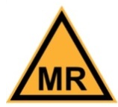
The following table shows MR safety warning indicators and their names and meanings. Please pay special attention to the symbols on your equipment, and obey all guidelines to protect staff and equipment from injury.
|
Symbol |
Name |
Description |

|
MR safe |
Components marked with the green MR safe indicator present no danger to staff and equipment operating in the MR room. |
|
Conditionally MR safe |
The yellow Conditionally MR safe indicator denotes components that are only MR safe in a limited fashion. Product-specific safety requirements apply. For additional details, consult the product manual's safety section. |

|
MR unsafe |
The red MR unsafe indicator denotes components prohibited from entering the MR room. |