
Introduction
The following demo shows how LabMaestro can be used to run gaze-contingent experiments with a TRACKPixx3. Participants can freely view an image (Auguste Renoir's Pont-Neuf) until they either press a key on their keyboard or fixate the image for 1000 seconds. This demo is split into two parts, each divided into an Epoch, meant to affect central and peripheral vision, respectively. As this demo is a showcase, no data is saved or recorded.
Prerequisites
-
LabMaestro is installed and activated.
-
An eye-tracking device (e.g., TRACKPixx3) is connected to your computer via an I/O hub (e.g., DATAPixx3).
Project Files
Step 1 - Tracker Calibration
The first step should be to calibrate the TRACKPixx3. To do so, press Configure TRACKPixx in the toolbar, as well as Wake TRACKPixx. Once in the Configure TRACKPixx window, take the time to define search limits, iris expected size, and properly adjust distance, participant positioning and tracker focus. Once done, press Calibrate to initiate a calibration routine. If you are testing this demo, the default parameters should already be well adapted.

If you want more information on calibration and more details on all available options, please consult this page.
Step 2 - Setting up Gaze Contingent Stimuli
To better understand how the demo works, let us look at the demo Timeline, specifically, at the properties of the Gaussian component. Below is a screenshot of the first epoch; the second is very similar. The Center property, which defines an element's position on the screen, is specified by a function (indicated by the fx characters to the right of the text field). While initially appearing as 0.0, clicking on the text field reveals its true value as an expression:
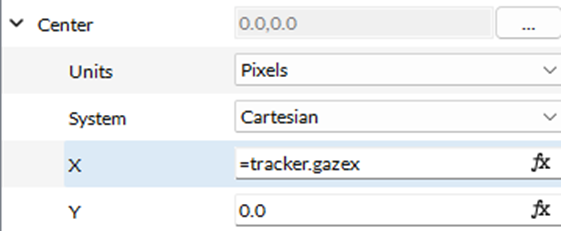
The X and Y coordinates of the mask correspond to the Tracker object's GazeX and GazeY properties, which approximate the gaze location. While these values are not as precise as the eye positions recorded in tracker data files (and are therefore not recommended for data analysis), they provide a sufficiently precise value for real-time use during the experiment. This value is updated in real time as the participant moves their gaze across the image.
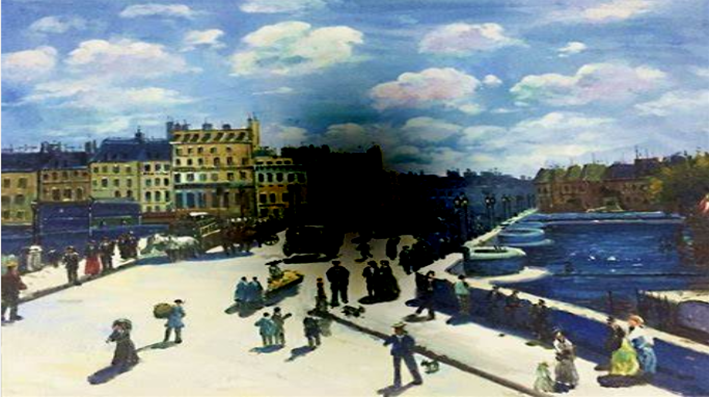
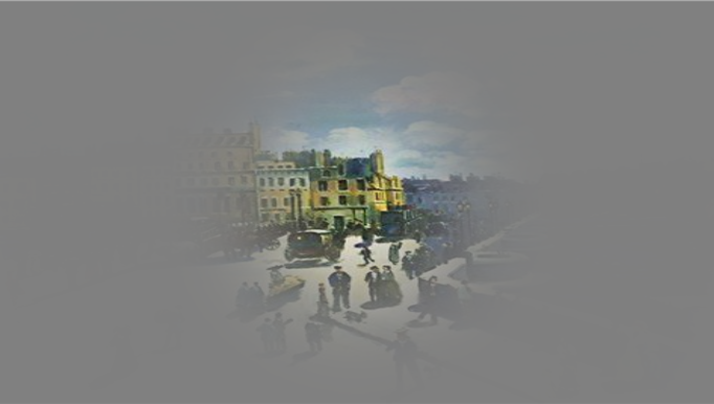
The last element used to make this demo work is Combine Modes. In the first epoch (centralMask), a Gaussian is added to the base image to hide what is behind the participant's gaze. In the second epoch, the Gaussian is multiplied, allowing only areas near its center to be visible. For more information, please consult this page.
Step 3 - Running the Demo
Pressing Launch Experiment will begin the demo. The first part of the demo creates a gaze-contingent, Gaussian mask in the participant's central vision (sd. = 3dva), making it more difficult to process elements in the central visual field.
The second part of the demo also creates a Gaussian in the participant's central vision. However, instead of masking central vision, it allows the image to pass through the Gaussian, which masks peripheral vision.
Related Links
Calibration with the TRACKPixx3