
Introduction
This template experiment is based on a paper by Carreiras & Clifton (1999), in which they recorded participants' gaze data while they read phrases. After finishing a trial, looking at a specific area on the screen started the subsequent trial. We demonstrate how to use participant fixations to control experiment flow with LabMaestro.
Prerequisites
-
LabMaestro is installed and activated.
-
An eye-tracking device (e.g., TRACKPixx3) is connected to your computer via an I/O hub (e.g., DATAPixx3).
Project Files
ExperimentFlow_Practice_FixControl.lm
Step 1 - Calibrate the TRACKPixx3
As this experiment requires the TRACKPixx3, you must first calibrate your device. The experiment includes a calibration component in the first timeline, as shown below, which will start a 13-point calibration.
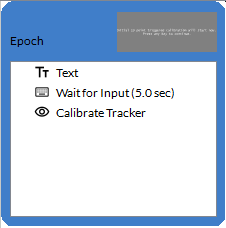
For more information on how to calibrate your tracker using the Calibrate Tracker component, as well as other calibration methods, please see this page.
Step 2 - Creating the Experiment Timeline.
Once tracker calibration is complete, the experiment can begin in earnest. We first show the participant instructions indicating that they must read the sentences and, once done, look at a white dot for 3 seconds to proceed to the next trial.
We then use a Constant Stimuli method component to list all sentences in the experiment. In the template experiment, we include four conditions: one in English and one in Spanish, along with two templates for additional Spanish and English sentences.
Controlling Flow - Using a Fixation Cross
Following the instructions, a fixation cross is shown to participants as part of the FixationCross Epoch. Our goal here is to ensure the experiment proceeds only after the participant has looked at the fixation cross for 3 seconds. The fixation cross is created from an Oval region.
We can implement this by creating a variable named Distance. We compute this variable using the following expression, which LabMaestro evaluates on every iteration of the epoch:
=floor(pow(pow(Tracker.GazeX-Oval.Center.X,2)+pow(Tracker.GazeY-Oval.Center.Y,2),0.5))
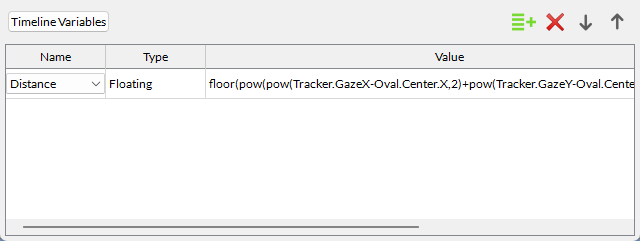
This equation measures the distance of a participant's fixation from the center of the fixation cross (Oval), using Pythagoras' Theorem. From this variable, we can define an exit condition in the Epoch properties so that it will only end whenever a fixation lasting three seconds has occurred on the fixation cross:
=Distance<Oval.Geometry.Width/2
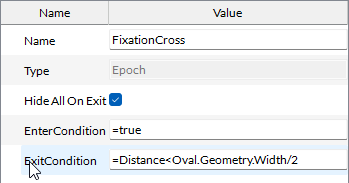
This expression ensures the experiment proceeds only if a fixation is measured within the fixation cross.
Controlling Flow - Experimental Trials
We use the same principle to control flow during the experiment trials epoch (StimWithFixationDot). Instead of a fixation cross, a fixation dot is located at the bottom of the screen, underneath the text stimulus. Once a participant has finished reading the phrase, they can fixate the fixation dot for a specified period to proceed to the next trial.
Once again, we use a Distance variable to define how far away a participant's gaze is from the fixation dot. In this case, we define Distance as:
=floor(pow(pow(Tracker.GazeX-FixationDot.Center.X,2)+pow(Tracker.GazeY-FixationDot.Center.Y,2),0.5))
This is the same equation as above, but we replaced the Oval component with the FixationDot component.
As for the exit condition, since we want the fixation to persist for a certain period, we need to consider not only its location but also its duration. We can do so with the following exit condition:
=(Distance<FixationDot.Geometry.Width/2) | ((FixStateTime-Time)>30)
The first part of the exit condition (on the left side of the | operator) is identical to the one used for the fixation cross, and checks that the fixation is close enough to the fixation dot. The second part (to the right of the | operator) checks for fixation duration using the FixStateTime global parameter, which returns the time at which the fixation began. If the fixation has lasted for more than 30 milliseconds, the condition returns true, and the experiment proceeds to the next trial.
Related Links
TRACKPixx3 page